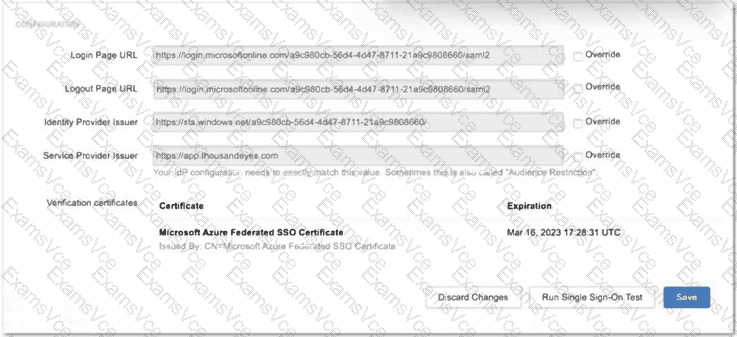
In theDesigning and Implementing Enterprise Network Assurance (300-445 ENNA)architecture, secure administrative access via Single Sign-On (SSO) is a critical component of platform governance. The exhibit illustrates the ThousandEyes SSO configuration panel being integrated withMicrosoft Entra ID(formerly Azure AD). When configuring SAML-based authentication, the "Identity Provider Issuer" (Option D) is a unique identifier provided by the IdP (Microsoft) that must match exactly between the two systems.
According to ENNA implementation guidelines, ThousandEyes populates default fields based on standard SAML metadata. However, Microsoft Entra ID often utilizes a specific GUID-based format for the Issuer URL (e.g., https://sts.windows.net/tenant-id/) that may differ from the generic URL format expected by the platform's initial auto-fill. To ensure a successful SAML handshake, the engineer must select the "Override"checkbox next to theIdentity Provider Issuerfield. This action unlocks the field, allowing the engineer to manually paste the exact string provided in the Entra ID Federation Metadata document. If this value is not overridden and matched precisely, the SAML assertion will be rejected, resulting in a failed authentication attempt.
While the Login and Logout URLs (Options B and C) are also critical, they are typically correctly identified during the initial setup or metadata import; theIdentity Provider Issueris the most frequent point of mismatch requiring an manual override in Entra ID environments due to its strict "Audience Restriction" requirements. TheService Provider Issuer(Option A) is generally a fixed value (https://app.thousandeyes.com) that rarely requires overriding as it defines ThousandEyes' own identity to the IdP.
Therefore, selecting the override for theIdentity Provider Issueris the necessary step to complete the integration and allow enterprise users to authenticate securely using their corporate credentials.