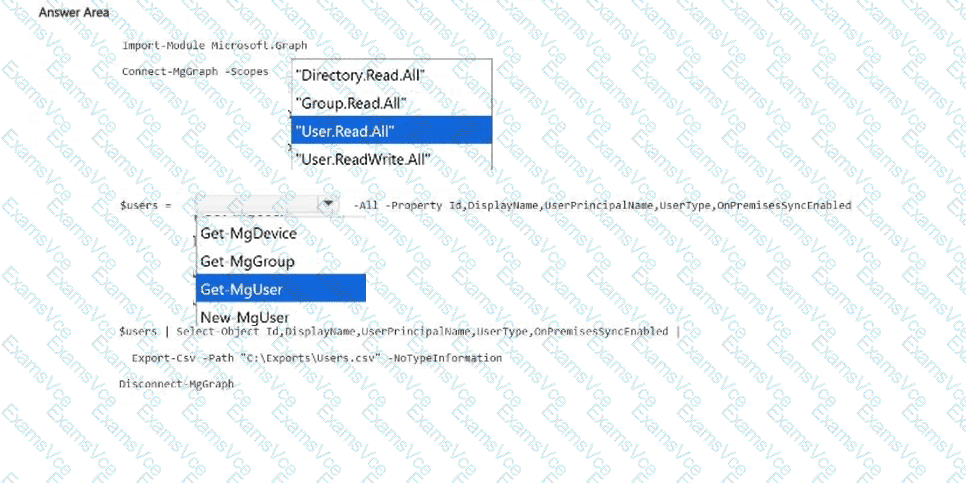
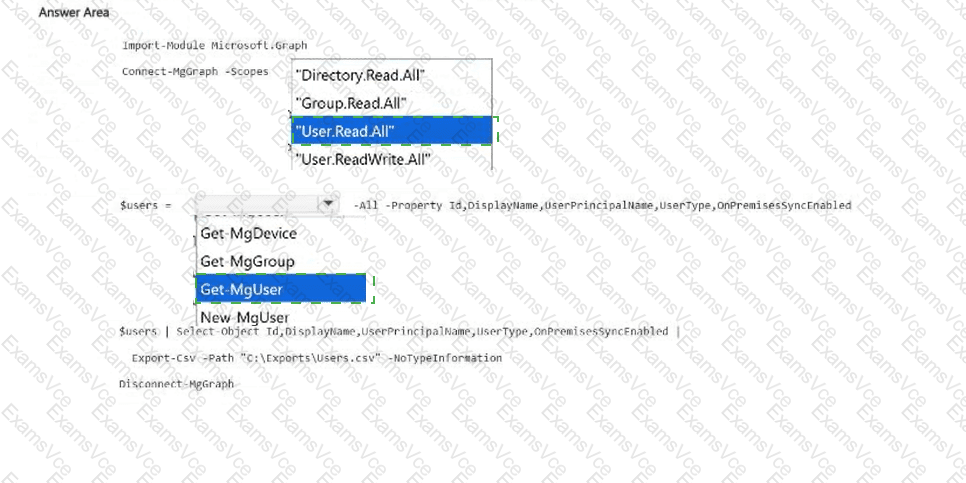
Connect-MgGraph -Scopes: User.Read.All; $users =: Get-MgUser
Completed PowerShell Script:
Import-Module Microsoft.Graph
Connect-MgGraph -Scopes " User.Read.All "
$users = Get-MgUser -All -Property Id,DisplayName,UserPrincipalName,UserType,OnPremisesSyncEnabled
$users | Select-Object Id,DisplayName,UserPrincipalName,UserType,OnPremisesSyncEnabled |
Export-Csv -Path " C:\Exports\Users.csv " -NoTypeInformation
Disconnect-MgGraph
Microsoft Graph PowerShell provides delegated access to Microsoft Entra user objects through Microsoft Graph permission scopes. The script requires both an appropriate read permission and a command capable of retrieving every user.
First selection: User.Read.All.
The delegated User.Read.All permission allows the application to read users ' full profiles. This includes properties beyond the basic identity information exposed through User.ReadBasic.All.
The requested UserType and OnPremisesSyncEnabled properties are not part of the limited basic profile available through User.ReadBasic.All.
Although Directory.Read.All could also provide access, it grants broader directory-reading privileges. Consequently, User.Read.All is the least-privileged appropriate scope for the stated requirements.
Second selection: Get-MgUser.
The Get-MgUser cmdlet retrieves Microsoft Entra user objects. The -All parameter retrieves results across all available pages, ensuring that the export is not limited to the first page.
The -Property parameter explicitly requests the required attributes, including OnPremisesSyncEnabled, which is not returned in the default property set.
Finally, Select-Object selects the exported columns, Export-Csv creates the CSV file, and Disconnect-MgGraph ends the Graph session.
Microsoft References:
https://learn.microsoft.com/en-us/graph/permissions-reference
https://learn.microsoft.com/en-us/powershell/module/microsoft.graph.users/get-mguser