
Special Halloween Sale - 75% Discount Offer - Ends in 0d 00h 00m 00s - Coupon code: vce75

A Data Analyst has the following primary data source that contairis a dimension named Dorm_Code.
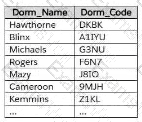
A Data Analyst has the following primary data source that contairis a dimension named Dorm_Code.

The analyst receives the following secondary data source that contains updated dorm codes.
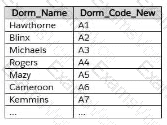
The analyst needs to bring the updated dorm codes into Tableau and use the codes in existing visualizations. The new dorm codes must use the existing field name of Dorm_Code.

What should the analyst do?

A.

Bring in the secondary table as a left join to the primary data source. From the Data Source page, select Create Calculated Field in the Dorm_Name field and enter [Dorm_Name_New] in the calculation window.

B.

Create a data blend and select Edit Primary Aliases to replace the primary data source alias values with values from the secondary data source.

C.

Bring in the secondary data source as a union.

D.

Bring in the secondary data source by using relationships. From the Data pane, right-click Dorm_Name, select Replace References, and then select Dorm Name New.

Salesforce Analytics-DA-201 Summary

  • Vendor: Salesforce
  • Product: Analytics-DA-201
  • Update on: Oct 27, 2026
  • Questions: 212
Price: $52.5  $149.99
Buy Now Analytics-DA-201 PDF + Testing Engine Pack

Payments We Accept

Your purchase with ExamsVCE is safe and fast. Your products will be available for immediate download after your payment has been received.
The ExamsVCE website is protected by 256-bit SSL from McAfee, the leader in online security.

examsvce payment method


