Scenario:
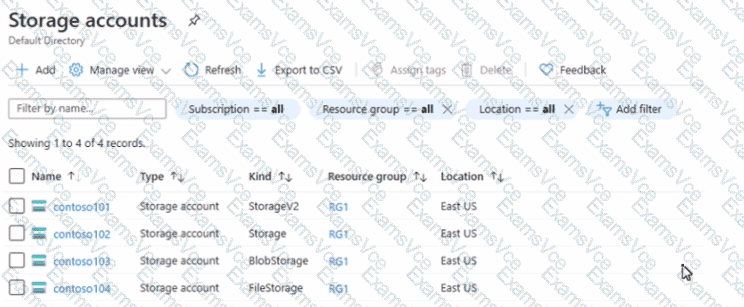
You have the following storage accounts:
Name
Type
Kind
Resource Group
Location
contoso101
Storage account
StorageV2
RG1
East US
contoso102
Storage account
Storage
RG1
East US
contoso103
Storage account
BlobStorage
RG1
East US
contoso104
Storage account
FileStorage
RG1
East US
Question 1:
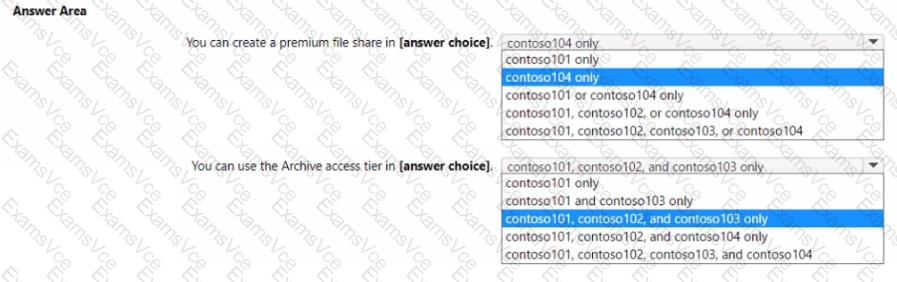
You can create a Premium file share in ___ ?
✅ Answer: contoso104 only
Premium file shares in Azure use Azure Files Premium performance tier, which is available only with FileStorage accounts.
Per Microsoft Azure documentation:
“To create a Premium file share, you must use a storage account of kind FileStorage with performance tier set to Premium.”
contoso104 is the only account of type FileStorage, so only it supports premium file shares.
Question 2:
You can use the Archive access tier in ___ ?
✅ Answer: contoso101, contoso102, and contoso103 only
The Archive access tier is available only for Blob storage objects stored in:
General-purpose v2 (StorageV2) accounts, or
BlobStorage accounts.
It is not supported in:
FileStorage accounts (used for file shares).
Thus:
contoso101 (StorageV2) ✅ Supports Archive tier
contoso102 (Storage) ❌ Legacy (no Archive support)
contoso103 (BlobStorage) ✅ Supports Archive tier
contoso104 (FileStorage) ❌ File shares only
Correction: Storage (V1) supports only Hot and Cool access tiers, not Archive.
So, the correct accounts that support the Archive tier are:
✅ contoso101 and contoso103 only
✅ Final Verified Answers:
Question
Correct Answer
You can create a premium file share in
contoso104 only
You can use the Archive access tier in
contoso101 and contoso103 only
Microsoft Azure Administrator Documentation Extracts:
“Premium file shares are available only in FileStorage accounts and provide low-latency, high-performance storage for Azure Files.”
“The Archive tier is supported for Blob Storage and General-purpose v2 accounts only.”
(Source: Microsoft Learn — “Azure storage account overview” & “Access tiers for Azure Blob Storage”)