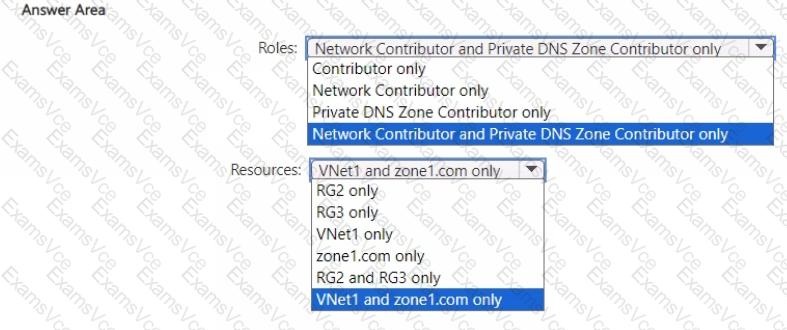
According to the Microsoft Azure Administrator (AZ-104) Study Guide and Azure Role-Based Access Control (RBAC) documentation, permissions to link an Azure Private DNS zone to a virtual network require access to both the virtual network resource and the DNS zone resource.
The process of linking a DNS zone to a virtual network establishes name resolution for the resources within that VNet through the Private DNS zone. To perform this operation, the user must have:
“Microsoft.Network/virtualNetworks/*” permissions (to modify and manage VNet settings).
“Microsoft.Network/privateDnsZones/*” permissions (to manage DNS zone links).
These permissions are granted by two built-in roles:
Network Contributor – Allows full management of the network resources like virtual networks, subnets, and network interfaces but does not allow access to manage DNS zones.
Private DNS Zone Contributor – Allows management of private DNS zones and their link configurations.
Therefore, to grant User1 the ability to link Zone1.com (Private DNS Zone) to VNet1, the correct approach is to assign both roles with the least privilege principle, scoped specifically to the required resources:
Network Contributor on VNet1
Private DNS Zone Contributor on zone1.com
Assigning the permissions at the resource level (and not at the resource group or subscription level) ensures compliance with the principle of least privilege, a core requirement of Azure governance.
This setup enables User1 to perform the exact operation (linking the Private DNS Zone to the VNet) while preventing unnecessary access to unrelated resources.
Final Verified Answer:
✅ Roles: Network Contributor and Private DNS Zone Contributor only
✅ Resources: VNet1 and zone1.com only