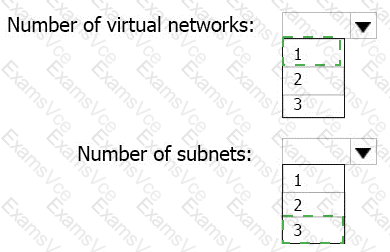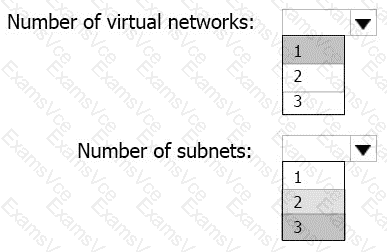
In this scenario, App1 consists of three distinct tiers — web front end, processing middle tier, and SQL database — each containing five virtual machines. The technical requirement specifies that the company must minimize the number of open ports between the App1 tiers, move all tiers of App1 to Azure, and ensure that all VMs are protected by backups.
According to Microsoft Azure architecture best practices for multi-tier applications (from Azure Architecture Center and the Azure Administrator curriculum), the optimal design involves:
Deploying all tiers of App1 into a single virtual network (VNet).
This allows all components of the application to communicate securely using private IP addresses.
Keeping all tiers within a single VNet simplifies management, security, and monitoring while supporting Network Security Groups (NSGs) for inter-tier traffic control.
Microsoft Documentation Extract:
“Use a single virtual network to host multi-tier applications. Divide the virtual network into multiple subnets, each representing a tier, and use network security groups (NSGs) to control traffic flow between tiers.”
(Source: Microsoft Learn – Design and implement virtual networks in Azure)
Creating separate subnets for each application tier (3 total).
Subnet 1: Web tier (internet-facing, HTTPS traffic)
Subnet 2: Application/Processing tier (internal communication only)
Subnet 3: Database tier (private, no internet access)
Using NSGs, administrators can explicitly allow or deny traffic between subnets, thus minimizing open ports between tiers and meeting the security requirement.
Microsoft Documentation Extract:
“Subnets provide isolation and segmentation within a virtual network. Each tier of an application should be deployed in its own subnet to apply network security policies and control exposure.”
(Source: Microsoft Learn – Azure virtual network design best practices)
Backups and Storage Requirements:
All VMs can use Azure Backup integrated with Recovery Services Vaults, which supports VM-level backup in a single VNet environment.
The blueprint files are stored in Azure Blob Storage with the archive tier, ensuring compliance with the storage and access control requirements.
By using one virtual network and three subnets, Contoso ensures efficient management, minimized administrative overhead, secure isolation of application tiers, and full compliance with Azure governance and security recommendations.
✅ Final Verified Answer: