
New Year Sale Special Limited Time 70% Discount Offer - Ends in 0d 00h 00m 00s - Coupon code: xmasmnth

A user creates an incoming payment for a customer and selects two invoices to be...

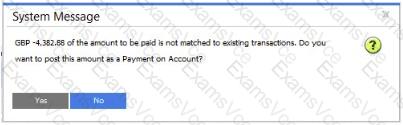
A user creates an incoming payment for a customer and selects two invoices to be paid. When the user tries to post the payment the system message that is shown in the attached screenshot appears.

What are possible reasons for this system message? Note There are 2 conect answers to this question.
A.

The user did NOT choose a payment means

B.

The amount in the Payment Means window does NOT match the total amount of invoices

C.

The customer uses a foreign currency and the exchange rate is NOT set up

D.

The invoices are NOT due yet

SAP C_TB120_2504 Summary

  • Vendor: SAP
  • Product: C_TB120_2504
  • Update on: Jan 1, 2026
  • Questions: 81
Price: $52.5  $149.99
Buy Now C_TB120_2504 PDF + Testing Engine Pack

Payments We Accept

Your purchase with ExamsVCE is safe and fast. Your products will be available for immediate download after your payment has been received.
The ExamsVCE website is protected by 256-bit SSL from McAfee, the leader in online security.

examsvce payment method


