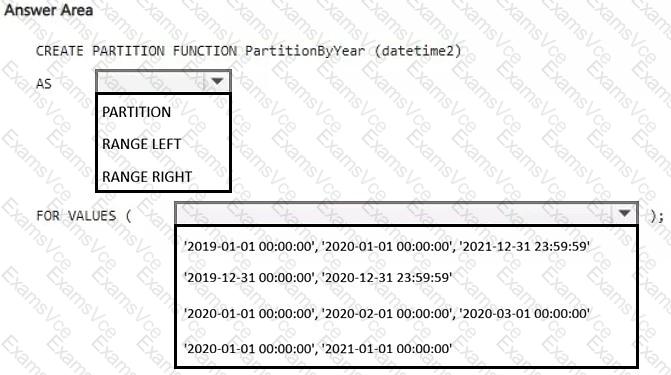
Partition range → RANGE RIGHT
Boundary values → ' 2020-01-01 00:00:00 ' , ' 2021-01-01 00:00:00 '
Comprehensive and Detailed Explanation with all Developing AI-Enabled Database Solutions documents : =
The correct configuration is to use RANGE RIGHT with boundary values at the start of each year :
CREATE PARTITION FUNCTION PartitionByYear (datetime2)
AS RANGE RIGHT
FOR VALUES (
' 2020-01-01 00:00:00 ' ,
' 2021-01-01 00:00:00 '
);
Microsoft documents that with RANGE RIGHT , each boundary value belongs to the partition on its right . For date-based partitioning, this is the natural pattern because a boundary such as 2021-01-01 becomes the lower boundary of the 2021 partition.
With these boundaries, the resulting ranges are effectively:
Partition 1: dates before 2020-01-01
Partition 2: 2020-01-01 through before 2021-01-01
Partition 3: 2021-01-01 and later
This cleanly separates the 2020 and 2021 data into year-aligned partitions. Microsoft specifically recommends RANGE RIGHT for date-based boundaries because the first day of a period remains in the same partition as the rest of that period.
The other boundary choices are incorrect or less appropriate:
Using year-end timestamps with RANGE LEFT is more cumbersome and can be sensitive to datetime2 precision.
Monthly boundaries would partition by month, not year.
Including 2019 and a 2021-12-31 23:59:59 boundary creates unnecessary partitions and is not the cleanest year-based design.
Therefore:
First dropdown: RANGE RIGHT
Second dropdown: ' 2020-01-01 00:00:00 ' , ' 2021-01-01 00:00:00 '