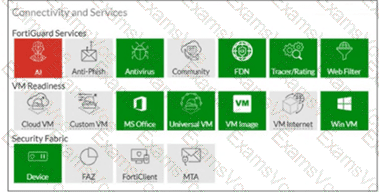
The exhibit shows the Connectivity and Services widget with VM Internet = GRAY (disabled) while Web Filter = GREEN (enabled) and Tracer/Rating = GREEN (enabled) .
Since VM Internet access is disabled (SIMNET mode), the Study Guide explicitly states what CANNOT be performed:
" When the malware does a DNS query, FortiSandbox responds with an internal IP address. Performing an IP reputation lookup on an internal IP would be meaningless. " — eliminates Option A
" When the malware attempts to download a file, FortiSandbox provides a fake download package. This allows the downloader to successfully execute; however, FortiSandbox cannot run its antivirus inspection on the file. " — eliminates Option B
" If the malware creates a callback connection to an IP, FortiSandbox cannot rate the IP, to determine if it ' s a botnet server. "
However, the Study Guide confirms URL rating CAN still be performed:
" FortiSandbox checks connection attempts to any URLs against the FortiGuard web filtering database. "
" Similarly, FortiSandbox assesses all IP connection attempts against the FortiGuard IP rating database to identify known command-and-control (C & C) servers. "
Since the Web Filter service is GREEN (active) , FortiSandbox can still:
Option C — Perform URL rating on HTTP GET requests using the FortiGuard web filtering database
Option D — Perform URL rating on FQDN seen in DNS requests using the FortiGuard web filtering database
These URL rating inspections use FortiSandbox ' s own internet connectivity (port1) to query FortiGuard, independent of the VM internet access status on port3.