From the exhibits:
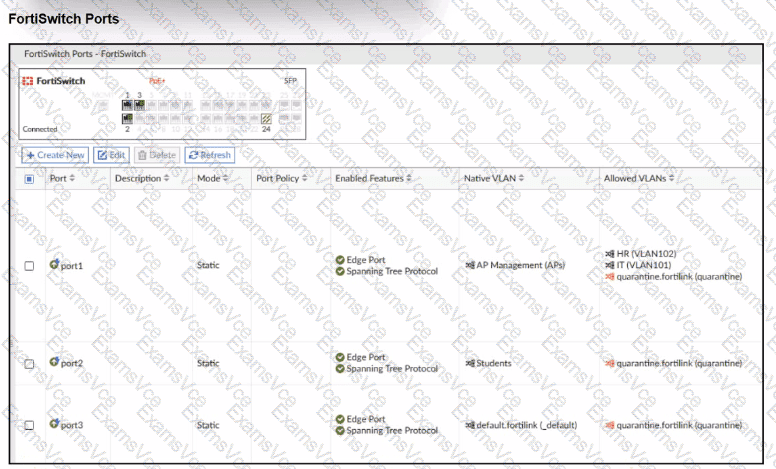
FortiSwitch Ports viewshows:
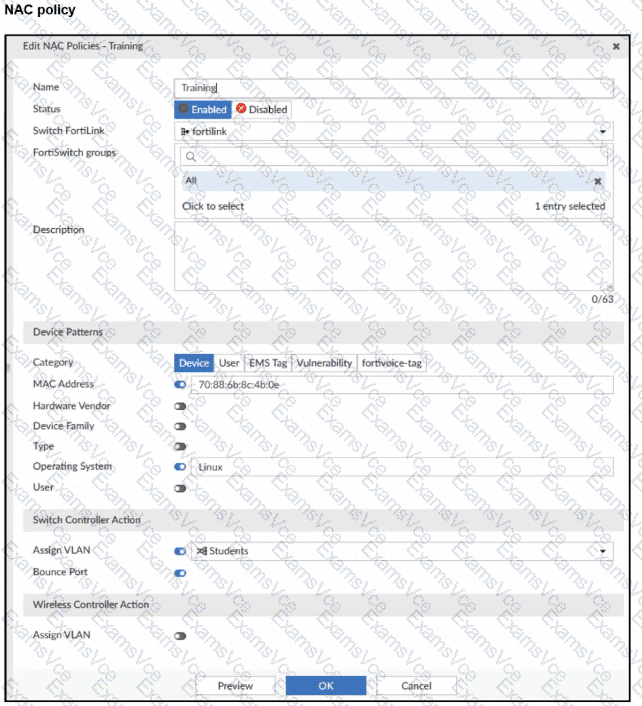
NAC policy “Training”:
Switch FortiLink: fortilink
Category:Device
Matching criteria:
MAC Address: 70:88:6b:8c:4b:0e (enabled)
Operating System:Linux(enabled)
Switch Controller Action:
Assign VLAN = Students
Bounce Port = enabled
Design intent:
Device with that MAC + OS Linux, when plugged intoport2, should be dynamically moved to VLANStudentsby the NAC policy.
Why it doesn’t work now
On FortiLink NAC,dynamic NAC decisions only apply on ports whose “Access Mode” is set to NAC:
NAC mode = FortiGate controls theonboarding VLAN, evaluates NAC policies, and then dynamically reassigns the switch port VLAN (access, quarantine, etc.).
Static mode(what we see on port2) means the port just uses its configurednative/allowed VLANs, andno NAC classificationhappens.
Right now:
port2 is astatic access portwith Native VLAN = Students.
The NAC policy exists, butFortiSwitch is not in NAC enforcement mode on that port, so the policy is never evaluated for traffic on port2.
Therefore, themissing configurationis:
Setport2toNAC mode(sometimes called “Access mode: NAC” or “NAC LAN edge port”).
Once port2 is changed to NAC mode:
Device initially lands in the onboarding/quarantine VLAN.
FortiGate collects device info (MAC, OS, etc.).
NAC policy “Training” matches MAC + Linux.
Switch controller actionAssign VLAN = Studentsis applied.
Port is bounced (if configured), bringing the device back up in VLAN Students.
Why the other options are wrong
B. MAC or OS misconfigured
Possible in general, but the question asks forwhich configuration is missing, and the exhibits clearly focus on port mode. Also, even with wrong MAC/OS, the port would still be in NAC mode; here NAC isn’t even active.
C. Port Policy mode
D. Students VLAN should be Allowed VLANs instead of Native VLAN
For an access port, having Students as thenative VLANis correct. NAC policy’s Assign VLAN will set that as access VLAN; no need to make it an allowed trunk VLAN.