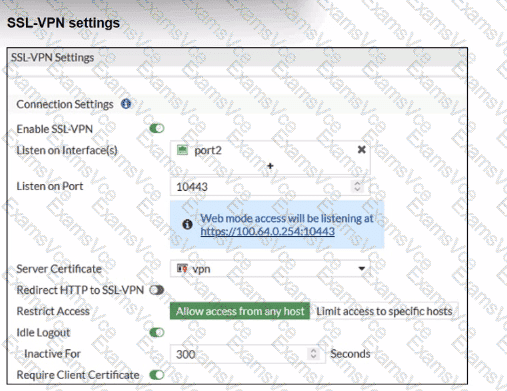
The SSL-VPN configuration hasRequire Client Certificateenabled. When this is enabled, FortiOS performs two checks:
Normal user authentication(username/password or PKI user)
Additional client certificate check– the client certificatemust be signed by a CA that FortiGate trusts
FortiOS documentation for “SSL VPN with certificate authentication” states:
“The client certificate only needs to be signed by a known CA in order to pass authentication.”
“The CA certificate is the certificate that signed both the server certificate and the user certificate… The CA certificate is available to be imported on the FortiGate.”
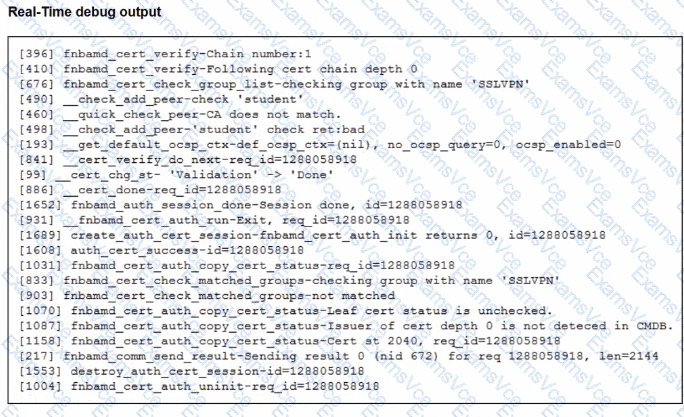
The debug output shows key lines:
__quick_check_peer-CA does not match.
Issuer of cert depth 0 is not detected in CMDB.
This tells us:
FortiGatedoes see the user’s certificate,
Butcannot find the issuing CAin its local CA certificate store (“CMDB” = configuration database).
This means theCA that signed the user certificate has not been importedinto FortiGate.
Now evaluate the options:
A. Enable Redirect HTTP to SSL-VPN– affects only redirection from HTTP to HTTPS; it has nothing to do with certificate validation.
B. Import the CA that signed the SSL VPN Server Certificate– the server certificate is already working (the portal comes up) and its CA is not what the debug complains about; the error is about thepeer (user) certificate. Often the same CA signs both, but the failing check specifically says the issuer of the client cert is not in CMDB.
C. Set the user certificate as the Server Certificate– incorrect; server and client certificates serve different roles.
D. Import the CA that signed the user certificate to FortiGate– this directly addresses the debug error and aligns with the documented requirement that the CA which issued the user certificate must be known to FortiGate.