The correct answer is C.
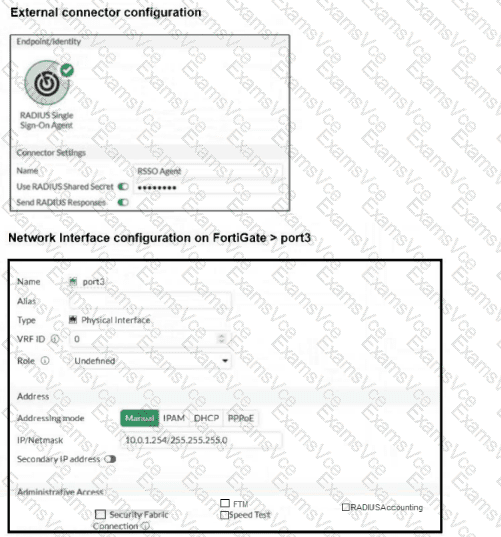
The key clue is in the port3 interface exhibit: the RADIUSAccounting administrative access option is not enabled.
The LAN Edge 7.6 Architect study guide states:
“First, you must enable RADIUS Accounting in the Administrative Access section on the FortiGate interface where you expect to receive RSSO messages.”
The FortiOS Administration Guide says the same thing more explicitly:
“In the Administrative Access section select the RADIUS Accounting checkbox. This will open listening for port 1813 on this interface. The FortiGate will then be ready to receive RADIUS accounting messages.”
The study guide also explains what those accounting messages contain:
“These messages are sent by RADIUS clients to report user session details such as start time, stop time, interim updates, and other relevant session information.”
So if port3 is the interface used for this communication, but RADIUSAccounting is not enabled on that interface, the accounting records carrying session and usage details are not handled correctly on that interface. That makes C the best answer.
Why the other options are incorrect:
A. Incorrect. If the RADIUS shared password were wrong, RSSO authentication would not be functioning correctly. The study guide says the shared secret must match the one on the RADIUS accounting server
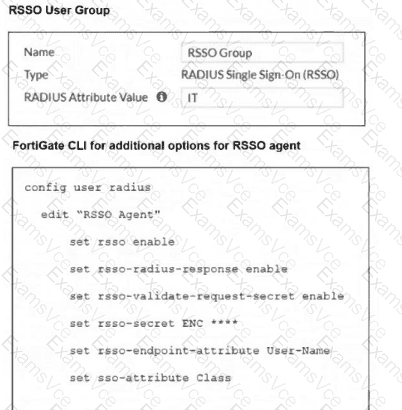
B. Incorrect. set rsso-radius-response enable is recommended so FortiGate sends responses to the accounting sender. Fortinet documentation says this should be enabled because otherwise some RADIUS servers may resend the same accounting message repeatedly, but it does not describe this as the main cause of missing session-detail visibility
D. Incorrect. A mismatch between sso-attribute and the RSSO group’s RADIUS Attribute Value would affect user-to-group matching on FortiGate. But the question says authentication and RSSO activity are already functioning as expected, so this is not the most likely cause
Final verified conclusion:
Because port3 is the interface carrying the RSSO communication and the exhibit shows RADIUSAccounting is not enabled there, the most likely issue is:
C. Misconfigured interface port3