Comprehensive and Detailed Explanation
HPE Press guide context | PDF page 87 | HPE Press, Aruba Certified Associate – Campus Access Official Certification Study Guide
Technical Deep Dive — Original Chat Wording
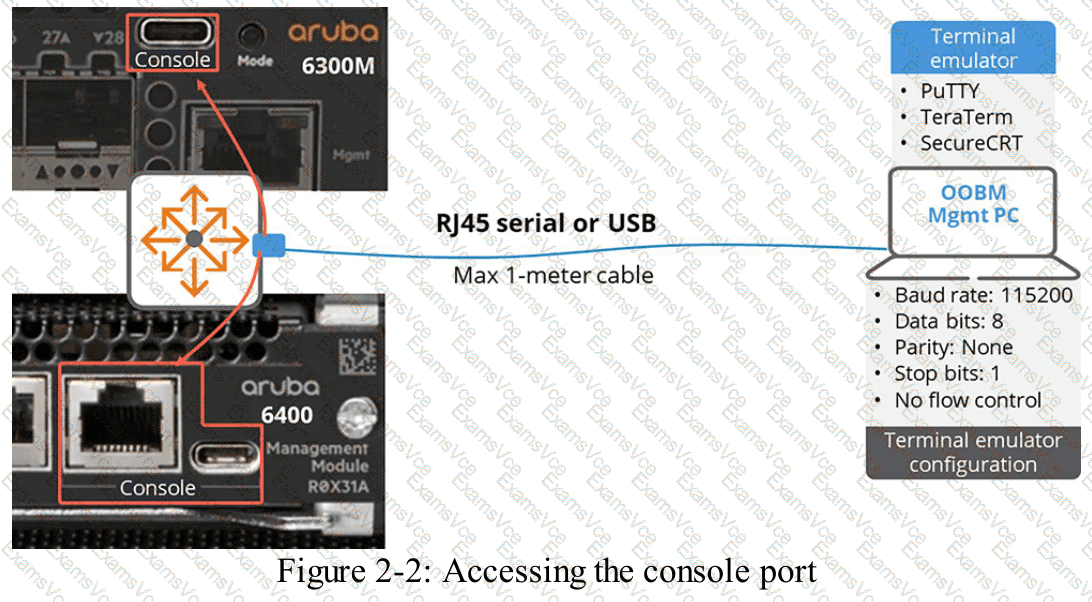
Initial configuration of an AOS-CX switch is commonly performed through its dedicated serial-console interface.
The console provides out-of-band management access without requiring the switch to have an operational IP address.
Depending on the switch model, the console interface may use USB-C, RJ-45 serial connectivity, or supported alternatives.
For a USB-C console, the administrator connects a compatible USB-C cable between the switch and a computer.
The operating system must recognize the resulting serial interface. A suitable driver may be required on some Windows systems.
Terminal-emulation software such as PuTTY can then establish the session.
For an RJ-45 serial console, the administrator uses the appropriate console cable and a compatible computer serial interface or adapter.
TeraTerm can establish the serial session using the required settings.
The standard configuration is:
Baud rate: 115200 bps
Data bits: 8
Parity: None
Stop bits: 1
Flow control: None
The guide also mentions Bluetooth-based initial management using the Aruba CX Mobile app , not the location app specified in Option A.
An RJ-45 crossover Ethernet cable does not replace the serial-console mechanism, and Switch Multi-Edit is not the terminal application described for this procedure.
Therefore, Options C and D are correct.
HPE Press study-guide figure / related learning illustration · Q200 Fig 2 2 Console Connection