Comprehensive and Detailed Explanation
HPE Press guide context | PDF page 589 | HPE Press, Aruba Certified Associate – Campus Access Official Certification Study Guide
Technical Deep Dive — Original Chat Wording
Device groups provide a logical way to organize network infrastructure in HPE Aruba Networking Central.
The primary benefit is simplifying configuration management across multiple devices with similar operational requirements.
For example, an organization may have 50 access switches deployed across several branch offices.
Instead of configuring every switch individually, administrators can place compatible switches into an appropriate device group and apply common settings.
These settings may include VLAN configuration, authentication policies, interface parameters, and supported management options.
Central supports group-level configuration methods, including graphical workflows and templates.
When a device joins a group, it can inherit the configuration associated with that group, reducing repetitive administrative work and configuration inconsistencies.
Administrators can create separate groups according to organizational requirements, device types, configuration methods, or operational responsibilities.
However, group membership should reflect actual configuration compatibility rather than arbitrary personal preferences.
Device groups do not automatically generate unique management subscriptions for each member.
Although groups can be used as scopes for monitoring and firmware management, their fundamental purpose is not specifically Internet traffic accounting or restricting upgrades to particular hardware models.
They provide a reusable administrative configuration boundary.
Therefore, Option A (Make configuration easier by organizing devices) is correct.
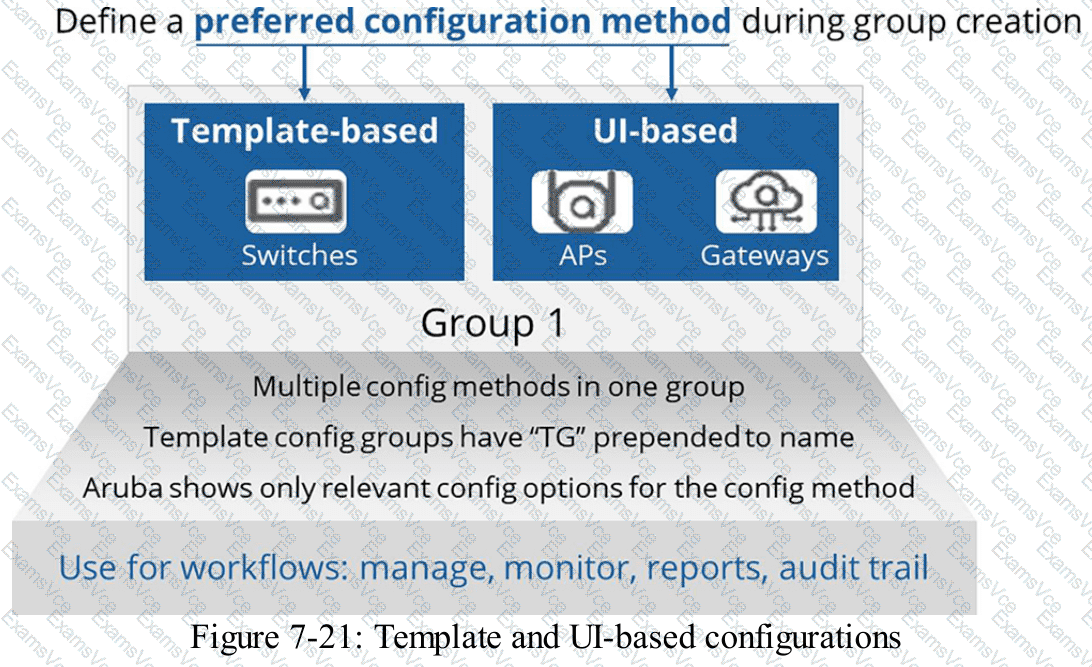
HPE Press study-guide figure / related learning illustration · Q197 Fig 7 21 Device Groups