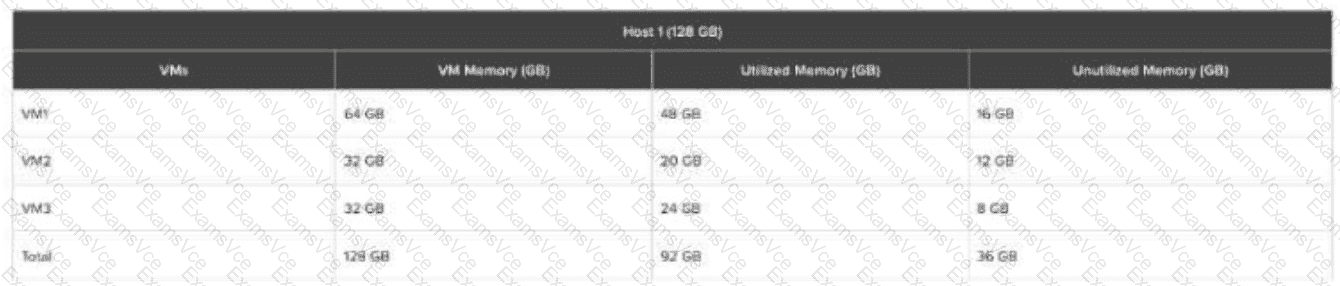
Understanding the Exhibit & Memory Allocation
Thehost has 128GB of physical RAM.
Thecurrent memory allocationacrossthree VMs (VM1, VM2, VM3) is 128GB, but only92GB is actually utilized.
This means there is36GB of unutilized memory available for allocation.
Step-by-Step Breakdown
Existing Memory Usage Before Adding VM4
Total Physical RAM:128GB
Used by running VMs (VM1, VM2, VM3):92GB
Unutilized Memory Available:36GB
After Creating and Running VM4
VM4 is allocatedmemory but only utilizes 28GB.
The table does not show VM4’s allocated RAM, but assuming it was given a reasonable allocation, it must have been taken from the36GB unutilized memory pool.
IfVM4 uses 28GB, theremaining unutilized memory is now (36GB - 28GB) = 8GB.
Maximum Memory Allocation for VM5
Sinceonly 8GB remains unutilized, the maximum memory VM5 can be allocated while still allowing it to power on is8GB.
Evaluating the Answer Choices
(A) 4GB❌(Incorrect)
More memory (8GB) is available, so limiting to 4GB is unnecessary.
(B) 8GB✅(Correct)
Theremaining unutilized memory after VM4 is 8GB, so VM5 can be allocated up to8GBwhile ensuring it can power on.
(C) 16GB❌(Incorrect)
Only8GB is left, so 16GB isnot possible.
(D) 32GB❌(Incorrect)
There isnot enough unutilized memoryto allocate 32GB.
Key Concept: Nutanix Memory Overcommit
Nutanix AHV supportsmemory overcommit, meaning VMs can be allocated more memory than physically available usingmemory ballooning and swapping.
However,to power on VM5 without impacting performance, it must fit within the available unutilized memory, which is8GB.