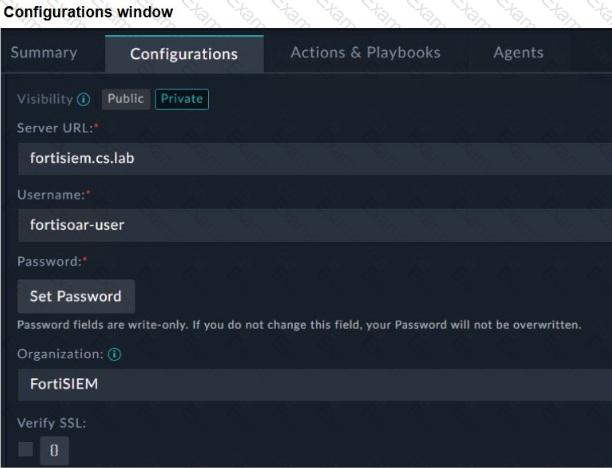
Exact Extract: “To configure the FortiSIEM connector on FortiSOAR, you must define the following parameters: Server URL… Username… Password… Organization: Specify the name of the organization that you will access on the FortiSIEM server. For an enterprise deployment model with no tenants, super is the organization.”
Exact Extract: “The minimum privileges required are Read and Update access on Incidents and access to Run Advanced Search Query.”
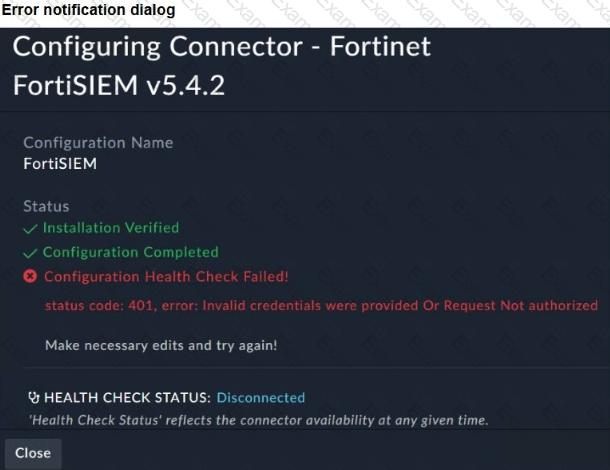
The correct answers are C and D . The error dialog shows status code: 401 with Invalid credentials were provided Or Request Not authorized . A 401 response means FortiSOAR reached FortiSIEM, but FortiSIEM rejected authentication or authorization. In the configuration exhibit, the Organization value is set to FortiSIEM . For a non-tenant enterprise deployment, the guide states that the organization should be super , so an incorrect organization can cause authorization failure. The other valid cause is incorrect FortiSIEM credentials, because username and password are mandatory connector configuration parameters.
A is wrong because Visibility controls whether the connector configuration is public or private inside FortiSOAR; it does not cause FortiSIEM API authentication failure. B is wrong because a reachability problem would normally produce a connection, DNS, timeout, or SSL error—not a FortiSIEM-generated 401 authorization response.
Technical Deep Dive: FortiSOAR connector health checks validate both transport and API authentication. Since installation and configuration completed but health check failed with 401, the network path and connector installation are not the primary issue. Fix the FortiSIEM username/password, confirm the account exists in FortiSIEM, confirm it has required permissions, and set the correct organization—typically super for an enterprise deployment without tenants. This is API authentication and authorization behavior; FortiGate NP/CP hardware offload is irrelevant because no firewall data-plane traffic processing is being analyzed.