
Special Halloween Sale - 75% Discount Offer - Ends in 0d 00h 00m 00s - Coupon code: vce75

Refer to the exhibits.

Refer to the exhibits. You use FortiManager to configure SD-WAN on three branch devices. When you install the device settings. FortiManager prompts you with the error " Copy Failed " for the device branch1_fat When you click the log button. FortiManager displays the message shown in the exhibit.
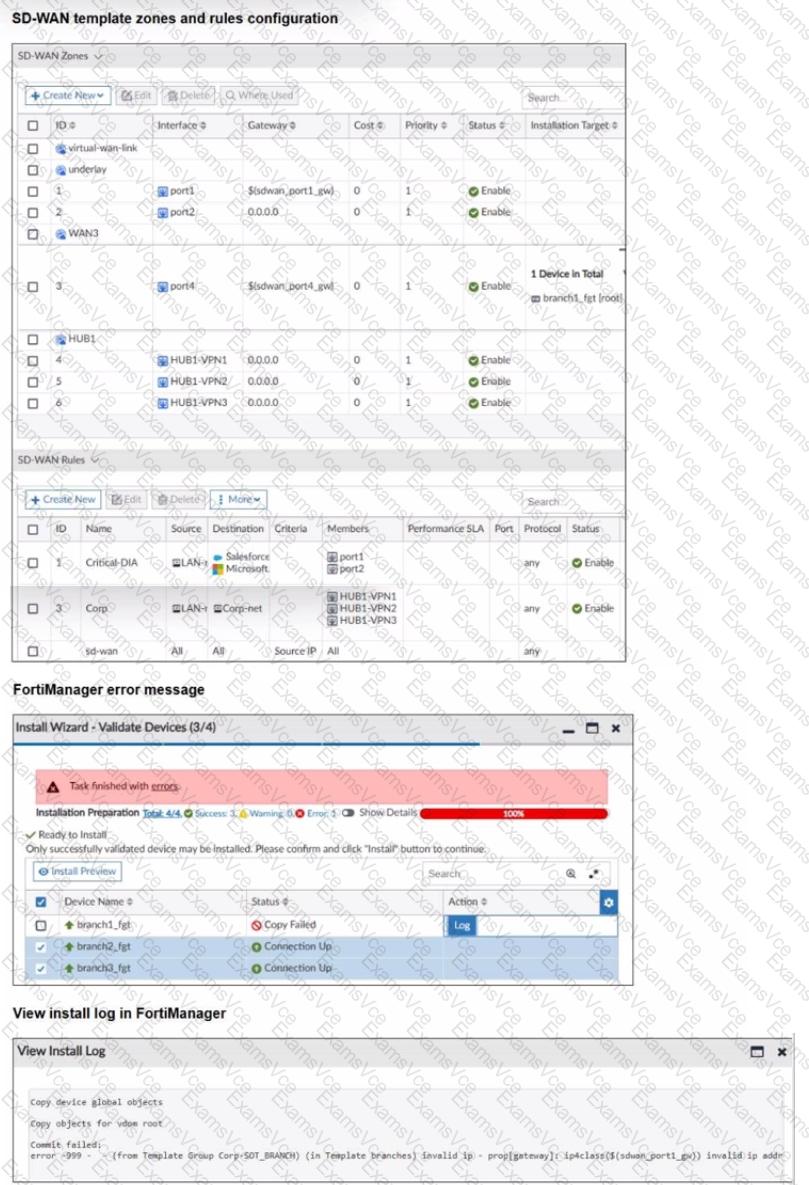
Exhibit 1

A.

Based on the exhibits, which statement best describes the issue and how you can resolve it?

B.

Remove the installation target for the SD-WAN member port4. You cannot combine metadata variable and installation targets.

C.

Gateways for all members in a zone must be defined the same way. Specify the gateway of the SD-WAN member port! without metadata variables.

D.

Check the connection between branch1_fgt and FortiManager

Fortinet NSE7_SSE_AR-26 Summary

  • Vendor: Fortinet
  • Product: NSE7_SSE_AR-26
  • Update on: Oct 27, 2026
  • Questions: 110
Price: $52.5  $149.99
Buy Now NSE7_SSE_AR-26 PDF + Testing Engine Pack

Payments We Accept

Your purchase with ExamsVCE is safe and fast. Your products will be available for immediate download after your payment has been received.
The ExamsVCE website is protected by 256-bit SSL from McAfee, the leader in online security.

examsvce payment method


