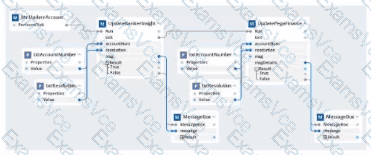
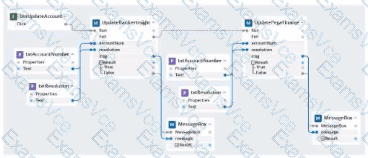
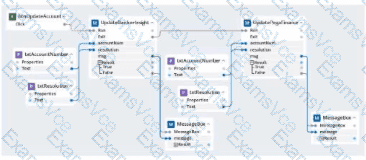
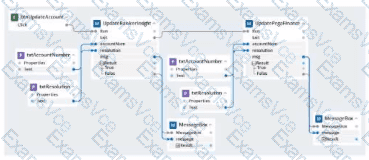
“Automations started from a Windows Form Click event run on the UI thread. To keep the form responsive, long-running work should be started by calling other automations asynchronously. When an automation is executed synchronously, the UI thread is blocked until the call completes. Executing the child automation asynchronously allows users to continue interacting with the form.”
“The Run method includes a synchronous parameter.
True – the caller waits for completion (blocks the UI).
False – the automation starts asynchronously and control returns immediately to the caller (UI remains available).
Default follows the project setting.”
“Invoking PerformClick from within an automation that is already handling the button’s click should be avoided. It re-triggers the button click and can lead to reentrancy or recursion and does not improve UI responsiveness.”
“Displaying a MessageDialog during processing is modal and prevents interaction with the form until the dialog is closed. Use only for completion or error notifications, not while long-running work is executing.”
Why Option B is correct:
Option B starts from the btnUpdateAccount.Click event (so no self-trigger via PerformClick).
It launches the downstream automations (UpdateBankerInsight and UpdatePegasFinance) using Run with the synchronous parameter set to False (asynchronous), which keeps the Windows form responsive and accessible to the user while updates run.
It does not introduce a modal MessageBox before or during the updates (dialogs are only used for completion/notification), so it avoids blocking the UI.
Why the other options are not correct:
Option A: Uses PerformClick on the button, which re-triggers the click and can lead to recursion without improving responsiveness.
Option C: Inserts a MessageDialog during the middle of processing, which is modal and blocks the form.
Option D: Calls the update automations synchronously (or leaves them at the blocking default), which holds the UI thread until completion and makes the form inaccessible during the run.