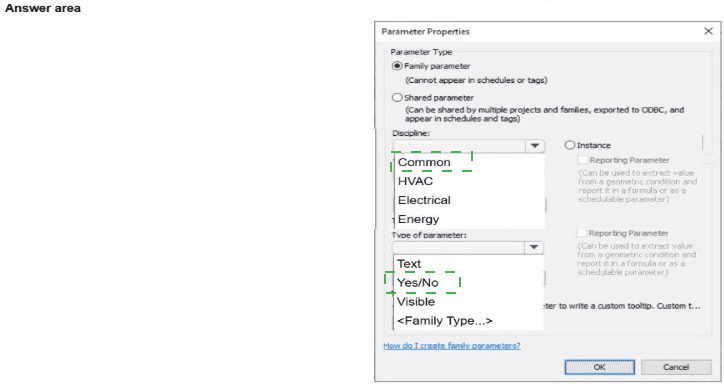
Discipline: Common
Type of Parameter: Yes/No
When an electrical designer is developing a panelboard family in Autodesk Revit and wants to control the visibility of an element—such as a clearance zone (typically used for equipment maintenance space, NEC 110.26 compliance, or access areas)—the correct method is to create a Family Parameter with a Yes/No (Boolean) value under the Common discipline.
According to the Revit MEP User’s Guide (Chapter 44 “Creating and Modifying Families”):
“Use a Yes/No parameter to control the visibility of geometry or symbolic lines in a family. When checked, the geometry displays in the project; when unchecked, it is hidden.”
This visibility control is typically applied to reference geometry such as safety clearance volumes or working spaces around electrical panels. These geometries are modeled within the family environment and linked to visibility parameters that the designer can toggle on or off in the Family Types dialog.
Additionally, the parameter must be created under the Common discipline, not Electrical or HVAC, because visibility controls are not discipline-specific—they apply to all Revit element types.
“Discipline defines the context of the parameter type. Visibility parameters are categorized under Common, as they are used across multiple disciplines.”
Step-by-step setup:
1️⃣ In the Family Editor, open the Family Types dialog.
2️⃣ Click Add Parameter → Name it Clearance Zone Visible.
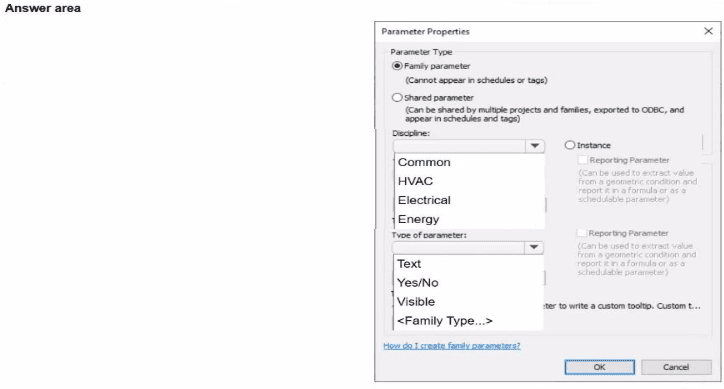
3️⃣ Under Parameter Type, select Family Parameter.
4️⃣ Choose Discipline: Common and Type of Parameter: Yes/No.
5️⃣ Assign this parameter to the Visible checkbox of the clearance zone geometry.
This allows the designer to easily control whether the clearance zone appears in plan, elevation, or 3D views—useful for coordination and documentation.
Incorrect Options Explanation:
HVAC, Electrical, Energy: Used for discipline-specific parameters like voltage, airflow, or load calculations.
Text or Number: Would not allow toggling visibility.
Visible (as type): Refers to linking geometry visibility, not defining a parameter type itself.
[References:, Autodesk Revit MEP User’s Guide – Chapter 44 “Creating and Modifying Families,” pp. 1028–1035, Smithsonian Facilities Revit Template User’s Guide – Section 7.9 “Electrical Family Standards and Visibility Controls,” p. 75, Autodesk Revit Electrical Design Essentials – “Controlling Visibility in Electrical Equipment Families”, , ]