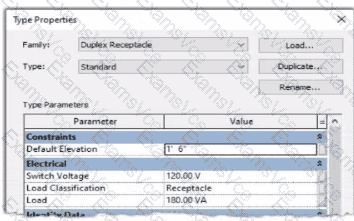
In Autodesk Revit Electrical Design, each electrical family (such as a receptacle, lighting fixture, or equipment) can contain one or more connectors that define how it interacts with the electrical system. The Load Classification parameter determines how the connected load is categorized in electrical schedules and load calculations (e.g., Lighting, Power, Receptacle, Other).
When a family’s Type Parameter Load Classification does not display correctly (e.g., it shows “Other” instead of “Receptacle” after being circuited), the issue lies in the power connector’s internal parameter not being linked to the family-level “Load Classification” parameter. Revit uses the connector’s classification to determine the load type when it is connected to a circuit — if the connector isn’t associated, the classification defaults to “Other.”
According to the Autodesk Revit MEP User’s Guide (Chapter: Electrical Systems – Creating Electrical Families), it specifies:
“To control how a component reports its connected load type, associate the power connector’s Load Classification parameter with a corresponding Family Parameter. This ensures the load classification in the circuit matches the family definition, rather than defaulting to ‘Other.’ To correct existing families, edit the family in Family Editor, select the connector, and associate its Load Classification parameter with the family’s Load Classification type parameter. Then reload the family into the project.”
This confirms that the correct approach is to edit the family and create or link the Load Classification parameter to the connector’s Load Classification field. Merely changing the connector value (option C) won’t ensure dynamic synchronization between the family type and circuit. Deleting and re-adding the connector (option B) won’t automatically create that link. Option D (editing through the System Browser) modifies instance-level data, not family associations.
Hence, the correct and permanent fix is:
Open the family in the Family Editor.
Select the power connector.
In the Properties palette, click the small Associate Family Parameter button (⚙️) next to Load Classification.
Link it to the family’s Load Classification parameter.
Save and reload the family into the project.
[References:, Autodesk Revit MEP 2011 User’s Guide, Chapter 53: Creating Electrical Families, pp. 1254–1257., Smithsonian Facilities Revit Template User’s Guide (2021), Section 8.3. Electrical Design: Power Connector Parameters., Autodesk Revit 2020 Help: “Associate a Connector Parameter with a Family Parameter.”, ]