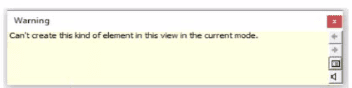
The warning message — “Can’t create this kind of element in this view in the current mode” — appears when an electrical designer attempts to place a Generic Annotation family inside a model family (e.g., a data device or electrical fixture) that is not configured to host annotation elements.
According to the Revit Electrical Design documentation, Generic Annotation families are 2D annotation elements, and therefore, cannot be created or viewed in 3D model views unless configured as “Shared.” The official guide clarifies:
“You can create generic annotation families and nest them inside host model families so that the annotations display in the project.”
However, this only functions correctly if the annotation is enabled to act independently within the host:
“To allow a nested annotation to be visible and editable when placed in a host model family, the nested annotation must be set to Shared before loading it into the host.”
If the nested annotation is not set to Shared, Revit cannot create or display it in the host’s model view, triggering this exact warning.
Thus, the correct workflow is:
Open the Generic Annotation family in the Family Editor.
Go to Family Category and Parameters.
Check the box “Shared” under Family Parameters.
Save and reload the family into the host electrical device family.
Other options—changing view level, detail level, or annotation orientation—do not resolve this placement restriction.