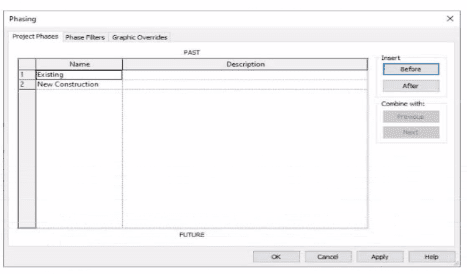
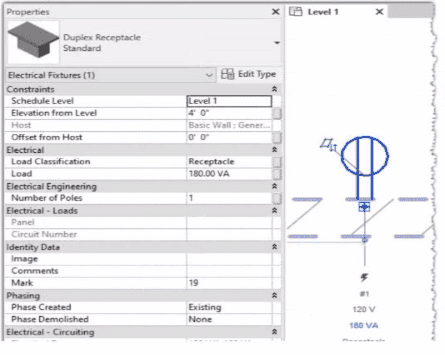
In Autodesk Revit, phasing allows designers to track existing, demolished, and new elements across different project stages. Every model element includes two key phasing parameters:
Phase Created — defines when the element was built or introduced.
Phase Demolished — defines when the element is removed or demolished.
In the provided exhibits:
The project contains two phases: Existing and New Construction.
The receptacle’s Phase Created parameter is set to Existing, indicating it belongs to the pre-existing building condition.
The architectural wall hosting the receptacle is to be demolished during New Construction.
When a view’s Phase is set to New Construction and its Phase Filter is configured to show demolition, only elements whose Phase Demolished equals New Construction will appear as to be demolished. Therefore, the electrical designer must set the receptacle’s Phase Demolished value to New Construction so that it graphically displays as a demolished element in the demolition plan.
As explained in the Autodesk Revit MEP User’s Guide – Phasing and Coordination:
“Elements created in one phase and demolished in a subsequent phase must have their ‘Phase Demolished’ parameter set to that later phase to display properly in demolition views.”
Thus, to correctly coordinate with the demolition of its host wall, the receptacle must be flagged for demolition during New Construction.