According to Microsoft’s SC-300: Microsoft Identity and Access Administrator Study Guide and Exam Ref SC-300, the behavior of the sign-in process depends on which authentication methods are enabled for the user or their group. Azure AD supports multiple strong authentication methods, such as Microsoft Authenticator app, FIDO2, and SMS, which can be targeted to specific user groups.
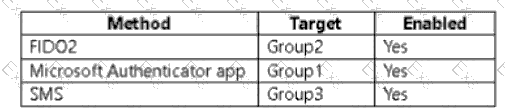
The question specifies that the tenant’s configuration enables the following methods:
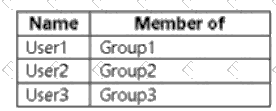
And user membership is:
User1 → Group1
User2 → Group2
User3 → Group3
The key phrase in the question is:
“Sign in to cloud apps by matching a number shown in the app with a number shown on their phone.”
This specific sign-in experience refers to the number matching feature in the Microsoft Authenticator app.
Number matching is a security enhancement in Azure AD MFA that requires the user to confirm a sign-in by matching a number displayed on the sign-in screen with the number shown in their Microsoft Authenticator app notification.
According to Microsoft Learn:
“When using the Microsoft Authenticator app for MFA, users will be prompted to enter or match a number displayed on the screen. This feature strengthens authentication by preventing accidental approvals.”
Therefore:
Only User1, who is a member of Group1 (the group enabled for Microsoft Authenticator app), will experience number matching when signing in.
User2 uses FIDO2, which employs a hardware key or biometric verification — not number matching.
User3 uses SMS, which involves a one-time passcode (OTP) — again, not number matching.
Hence, only User1 will sign in to cloud apps using number matching.