According to the Microsoft SC-300 official study guide and Microsoft documentation on Azure AD Privileged Identity Management (PIM), PIM is used to manage, control, and monitor access within Azure Active Directory (Azure AD), Azure resources, and Microsoft 365. However, not every administrative role within Azure or Microsoft 365 can be managed or activated through PIM.
To understand which administrators can use PIM, we need to review how Azure roles are structured:
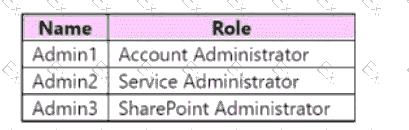
Account Administrator — This role is a classic subscription administrator role, not part of Azure AD role-based access control (RBAC). Therefore, it is not managed or activated through PIM.
Service Administrator — Also a classic Azure subscription role, but it maps to the Owner role in Azure RBAC. PIM can manage and activate this role because it exists within the RBAC model, which PIM supports.
SharePoint Administrator — This is an Azure AD directory role, not a classic subscription role, and is supported in Azure AD PIM. Azure AD PIM supports activation for directory roles such as Global Administrator, SharePoint Administrator, Exchange Administrator, etc.
From Microsoft’s official documentation:
“Azure AD Privileged Identity Management can manage role assignments for both Azure AD directory roles and Azure resource roles (via Azure RBAC). Classic subscription administrator roles such as Account Administrator are not supported.”
Therefore, Admin1 (Account Administrator) cannot use PIM because their role is outside the scope of PIM. Admin2 (Service Administrator) and Admin3 (SharePoint Administrator) can both use PIM since their roles are recognized by PIM as eligible for activation.