This scenario represents a classic CPU-bound performance issue, which is covered under the Troubleshooting domain of CompTIA Linux+ V8. The most important indicator is the load average compared to the number of available CPU cores.
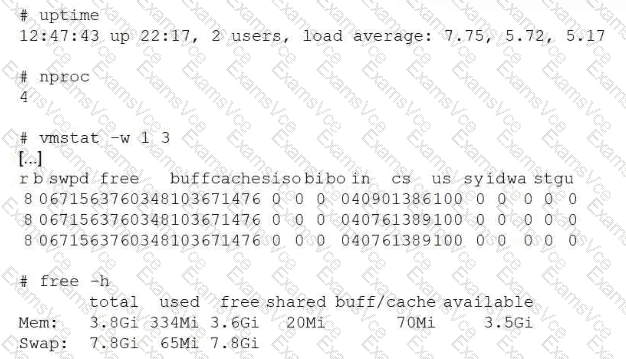
The system has 4 CPU cores, as shown by nproc, but the load averages are consistently above 5, with a peak of 7.75. Load average reflects the number of processes either actively running on the CPU or waiting for CPU time. When the load average exceeds the number of CPU cores for extended periods, it indicates CPU contention. Processes must wait longer to be scheduled, resulting in delayed task completion.
The memory statistics confirm that memory is not the bottleneck. free -h shows over 3.5 GiB of available memory, and swap usage is minimal. Additionally, vmstat shows no significant swap-in or swap-out activity and low I/O wait, ruling out memory pressure and disk bottlenecks.
Increasing swap space would not help because the system is not memory constrained. Adding more disks would not address CPU scheduling delays. Increasing free memory is unnecessary because sufficient memory is already available.
Linux+ V8 documentation emphasizes correlating load average with CPU core count to diagnose CPU saturation. The most effective way to speed up job execution in this case is to increase CPU resources, such as adding more vCPUs, moving the workload to a more powerful system, or distributing the workload across multiple systems.
Therefore, the correct answer is B. Increase the amount of CPU resources available to the system.