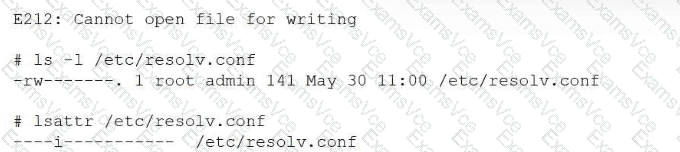
This scenario involves Linux file attributes and falls under the System Management domain of the CompTIA Linux+ V8 objectives. Although the administrator is operating as the root user, the system prevents the file from being modified. This behavior indicates that standard UNIX permissions are not the root cause of the problem.
The critical clue is provided by the lsattr /etc/resolv.conf output, which shows the immutable (i) attribute set on the file. When a file is marked immutable, it cannot be modified, deleted, renamed, or written to by any user, including root. This restriction overrides normal file permissions and ownership settings.
The chattr command is used to modify extended file attributes on Linux filesystems such as ext4. The option -i specifically removes the immutable attribute, restoring the file’s ability to be edited. Therefore, running chattr -i /etc/resolv.conf allows the administrator to open and modify the file successfully.
The other options do not resolve the issue. chown root changes file ownership, but the file is already owned by root. chmod 750 modifies permission bits, but permissions are ignored when the immutable attribute is set. chgrp root changes the group ownership, which also has no effect when immutability is enforced.
Linux+ V8 documentation highlights immutable files as a security and stability feature, commonly used to protect critical configuration files from accidental or unauthorized changes. Administrators must explicitly remove this attribute before making modifications.
Therefore, the correct command to allow editing the file is B. chattr -i /etc/resolv.conf.