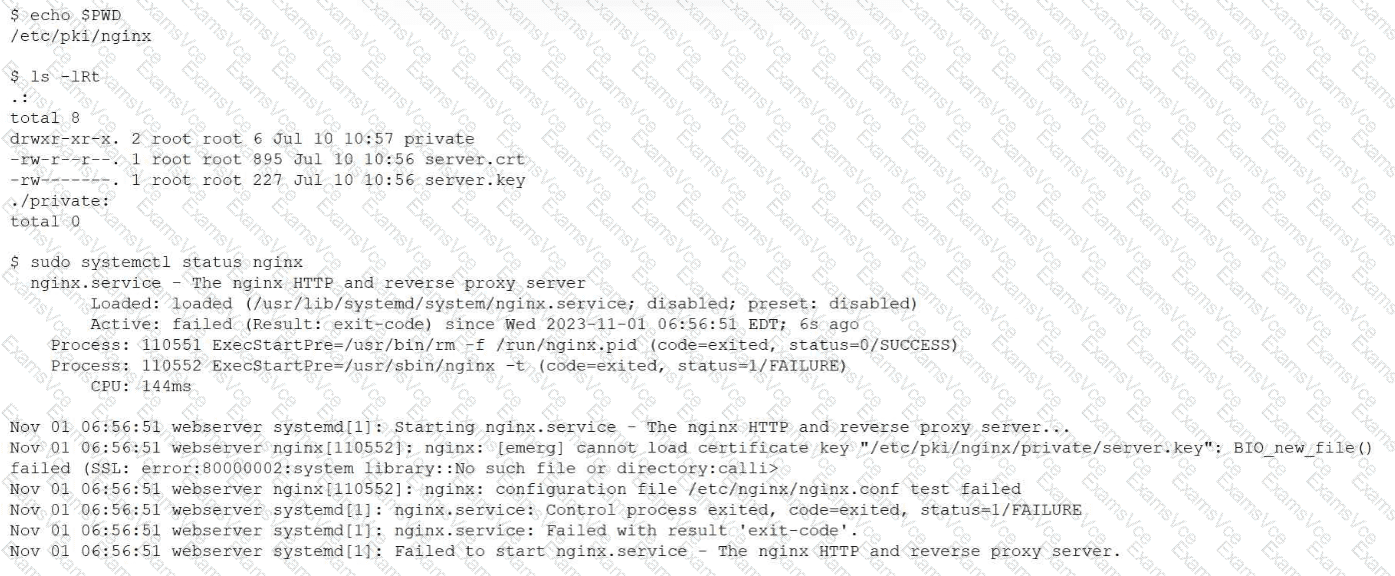
This issue falls under the Troubleshooting domain of the CompTIA Linux+ V8 objectives, specifically service startup failures and certificate-related errors. The provided output clearly indicates that the NGINX service fails during startup due to an inability to locate the private key file.
The critical error message is:
cannot load certificate key "/etc/pki/nginx/private/server.key": No such file or directory
This message confirms that NGINX is explicitly configured to look for the private key in the directory /etc/pki/nginx/private/. However, the directory listing shows that the private directory exists but is empty, while the server.key file is located in /etc/pki/nginx/ instead. Because NGINX cannot find the private key at the configured path, the configuration test (nginx -t) fails, and systemd prevents the service from starting.
Option C correctly identifies the root cause: the private key is not in the correct location. Moving server.key into /etc/pki/nginx/private/ (or updating the NGINX configuration to match the current location) would resolve the issue. Linux+ V8 documentation stresses that service failures often result from misaligned configuration paths rather than corrupted files.
The other options are incorrect. Option A incorrectly refers to renaming a certificate file and does not address the path issue. Option B suggests a key mismatch, which would generate a different SSL error rather than a “file not found” error. Option D is also incorrect because private keys should not have executable permissions like 0755; typically, they are restricted (for example, 0600) for security reasons.
Therefore, the web service is not responding because the private key file is not located in the directory expected by the NGINX configuration. The correct answer is C.