Option
Correct Action
B
Change Mode from Audit to Enforced
D
Install the Microsoft Entra Password Protection DC Agent on all writable domain controllers
F
Install the Microsoft Entra Password Protection Proxy
Microsoft Entra Password Protection extends global and custom banned password policies to on-premises Active Directory Domain Services (AD DS).
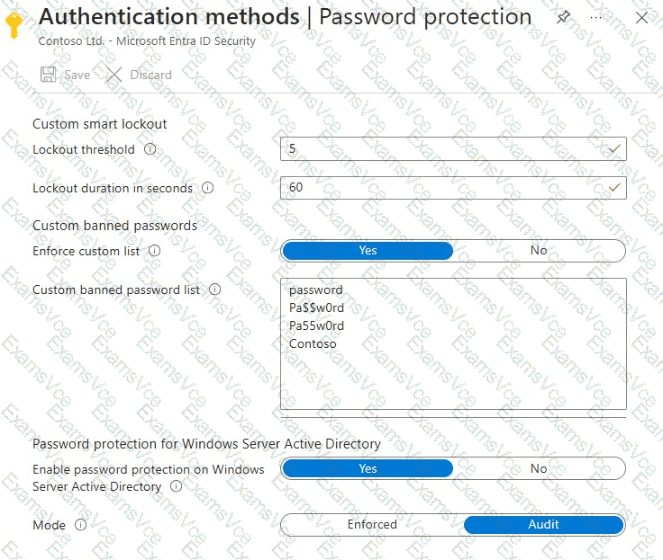
Option B is correct. The exhibit shows that password protection for Windows Server Active Directory is enabled but operates in Audit mode. Audit mode records weak password attempts without rejecting them. Changing the setting to Enforced ensures passwords failing validation are rejected.
Option D is correct. Microsoft Entra Password Protection requires the DC Agent on every writable domain controller to provide consistent enforcement. The agent evaluates password changes and resets against the downloaded banned password policies.
Option F is correct. The Password Protection Proxy communicates with Microsoft Entra ID and enables domain controllers to retrieve updated global and custom banned password policies. This component is mandatory for on-premises deployment.
Option A is incorrect because the Default Domain Policy does not configure Microsoft Entra ' s banned password lists.
Option C is incorrect because the Application Proxy connector provides application connectivity, not password protection.
Option E is incorrect because the exhibit already shows Enforce custom list set to Yes.
Important: Microsoft recommends installing the Password Protection Proxy on a domain-joined member server rather than a domain controller in production. Installing it on a domain controller is supported for testing but creates additional security considerations.
Also, password protection evaluates new password changes and resets; it does not retroactively invalidate existing passwords.
Microsoft References: