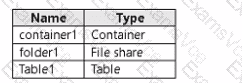
In this scenario, the Azure subscription contains a storage account (storage1) with three resources:
container1 (Blob container)
folder1 (File share)
Table1 (Table storage)
User1’s assigned roles:
Storage Blob Data Reader → Read-only access to Blob data (cannot write).
Storage Table Data Contributor → Read, write, and delete access to Table data.
Storage File Data SMB Share Contributor → Read and write access to Azure File shares.
Now, let ' s analyze access using key1 and SAS1.
1️⃣ Access via key1
When using an account key, access is granted to all services within the storage account—Blob, File, Queue, and Table, because the key authenticates at the account level.
However, the question specifically asks:
“To which resources can User1 write by using SAS1 and key1?”
While account keys grant access to all resources, write permissions depend on the assigned roles of User1 for that account.
User1 can:
Write to the File share (folder1) because they are a Storage File Data SMB Share Contributor.
Write to the Table (Table1) because they are a Storage Table Data Contributor.
Cannot write to the Blob container (container1) because they only have the Storage Blob Data Reader role, which is read-only.
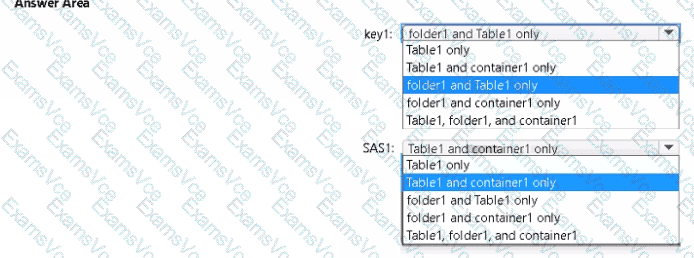
✅ Therefore, using key1, User1 can write to folder1 and Table1 only.
2️⃣ Access via SAS1
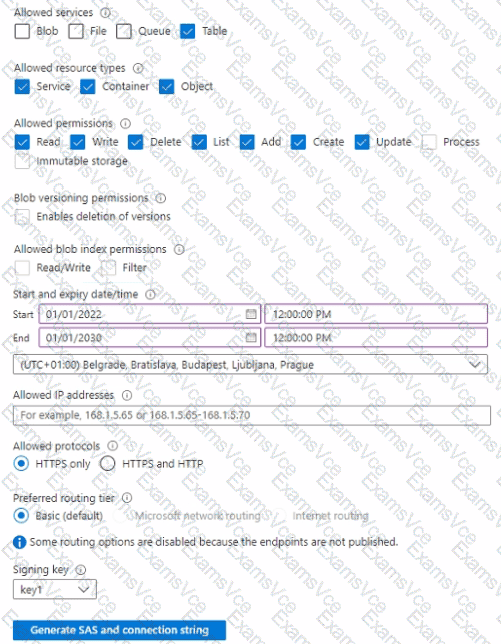
The Shared Access Signature (SAS) shown in the exhibit specifies:
Allowed services: Blob, File, and Table (Queue not selected).
Allowed permissions: Read, Write, Delete, List, Add, Create, and Update.
Start and expiry: Valid from 2022 to 2030.
Protocols: HTTPS only.
SAS defines data plane access, allowing specific operations within the defined services, regardless of the user’s assigned Azure roles.
Therefore, the SAS allows:
Access to Blob service → affects container1
Access to File service → affects folder1
Access to Table service → affects Table1
However, the question specifically distinguishes SAS1 and key1. Because SAS1 defines services explicitly, the question’s options match how Azure limits SAS to only those selected services.
Hence, SAS1 allows write access to:
Table1 (Table service)
container1 (Blob service)
✅ Therefore, using SAS1, User1 can write to Table1 and container1 only.
✅ Final Verified Answer:
Access Method
Write Access To
key1
folder1 and Table1 only
SAS1
Table1 and container1 only
Reference Extract (Azure Documentation):
“A shared access signature (SAS) grants limited access rights to Azure Storage resources for a specified time and set of permissions. The permissions are defined per service selected (Blob, File, Queue, Table).”
“Using an account key provides full access to all data objects in the storage account, but effective access may still be limited by assigned RBAC roles if role-based access control is enforced.”