According to theFortiClient EMS 7.2/7.4 Administration Guide(specifically theQuarantine ManagementandMalware Protectionsections), the correct administrative workflow to restore a blocked file and ensure it is no longer flagged as malicious is to use theQuarantine Managementfeature on the EMS server.
1. Analysis of the Exhibit
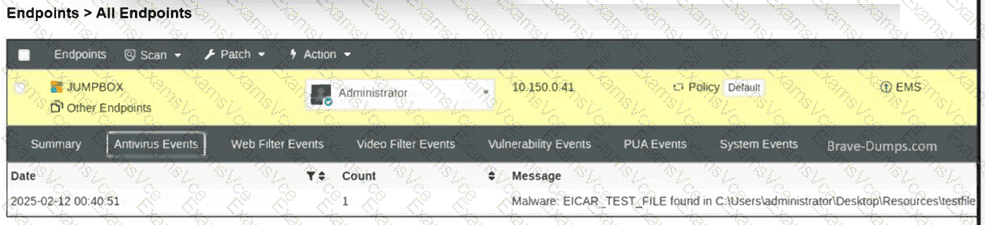
Event Type:The exhibit shows anAntivirus Eventwhere a file named testfile.txt was flagged as Malware: EICAR_TEST_FILE.
Location:The file was found in a local user directory (C:\Users\administrator\Desktop\Resources\testfile.txt).
System State:The endpoint is managed by EMS (indicated by thePolicy: DefaultandEMSstatus icons).
2. Why Option D is the Correct Choice:
Centralized Control:In a managed environment, the administrator uses the EMS console to oversee security incidents. To restore a file that has been quarantined, the administrator must navigate toQuarantine Management > Files.
Allowlist & Restore Action:By selecting the specific blocked file (testfile.txt) and clickingAllowlist & Restore, two things happen simultaneously:
Restoration:EMS sends a command to the FortiClient endpoint to release the file from the local quarantine folder and return it to its original path.
Allowlisting:The file's hash is added to theAllowlist(managed underQuarantine Management > Allowlist), which prevents FortiClient from re-quarantining the file during future real-time or on-demand scans.
Accessibility:This is the documented method to make a file "accessible on the endpoint" while ensuring it is not immediately re-blocked by the security engine.
3. Why Other Options are Incorrect:
A. Restore access directly using FortiClient:While FortiClient has a local quarantine tab, the "Release" button is typicallygreyed outor restricted when the client is managed by EMS to ensure centralized security policy enforcement.
B. Allow the webserver URL in the exclusion list:The exhibit shows anAntivirus/Malwareevent, not aWeb Filterevent. The file has already been downloaded to the local disk and is being blocked by theReal-Time Protectionengine, so a Web Filter URL exclusion would have no effect on the local file block.
C. Exclude testfile.txt from the malware protection profile:While adding a path exclusion to the Malware Protection profile is a valid way to prevent future scans of a directory, it doesnot automatically restorea file that hasalreadybeen moved to quarantine. The proper workflow for an existing block is to use the Quarantine Management tool first.