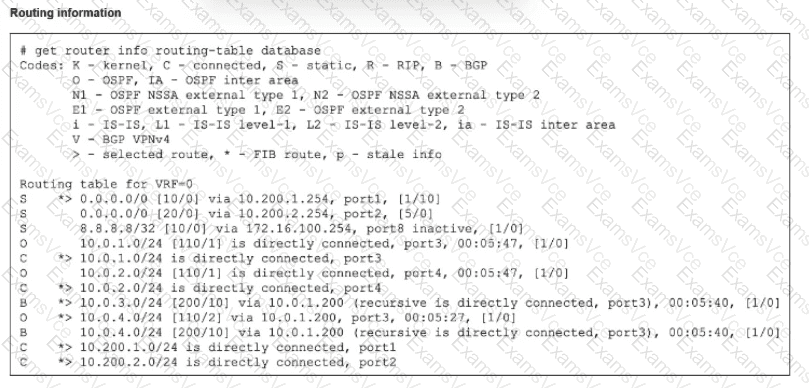
We must analyze the flags (*, >, S, O, B) and Administrative Distances (AD) shown in the get router info routing-table database exhibit to determine the correct statements.
Analysis for Option A (The BGP route to 10.0.4.0/24 is not in the forwarding information base):
True. Look at the entry for 10.0.4.0/24.
There is an OSPF route: O *> 10.0.4.0/24 [110/2]. The * indicates it is in the FIB, and > indicates it is the selected route.
There is a BGP route: B 10.0.4.0/24 [200/10]. This line lacks the * flag.
Reason: The OSPF route has an Administrative Distance of 110. The BGP route (iBGP) has an AD of 200. Since 110 is lower than 200, OSPF wins, and the BGP route is not installed in the Forwarding Information Base (FIB).
Analysis for Option B (The default static route through 10.200.1.254 is in the forwarding information base):
True. Look at the 0.0.0.0/0 entries.
The first entry is S *> 0.0.0.0/0 [10/0] via 10.200.1.254.
The * flag confirms this specific route is installed in the FIB.
The second static route (via 10.200.2.254) has a higher distance ([20/0]) and no * flag, so it is inactive.
Why C is False: ECMP (Equal Cost Multi-Path) requires routes to have the same cost/priority. Here, one static route has AD 10 and the other has AD 20. They are not equal, so ECMP is not performed.
Why D is False: The routing table database shows active routes, not the raw Link State Advertisement (LSA) database. You cannot determine the number of LSAs received solely from this output.
[Reference:, FortiGate Security 7.6 Study Guide (Routing): "The routing table database displays all known routes... The * indicates the route is in the FIB... Lower Administrative Distance is preferred.", , , ]