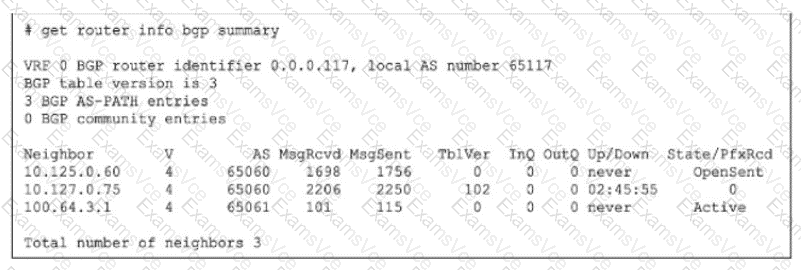
To identify the reason for the lack of prefixes, we must interpret the State/PfxRcd and Up/Down columns in the get router info bgp summary exhibit.
Analyze Neighbor Status:
Neighbor 10.125.0.60: State is OpenSent. This session is not established. It is stuck in the negotiation phase.
Neighbor 100.64.3.1: State is Active. This session is not established. The router is actively trying to initiate a TCP connection.
Neighbor 10.127.0.75:
Up/Down: 02:45:55. This indicates the BGP session has been Up (Established) for almost 3 hours.
State/PfxRcd: 0. This number represents the count of prefixes received. The session is fully established, but the neighbor has sent zero routes.
Determine the Cause:
Since the session with 10.127.0.75 is established, connectivity and handshakes (Options A, B, C) are not the issue for this neighbor.
The fact that it is Up but sending 0 prefixes strongly implies that the neighbor is configured to filter out its routes before sending them to the local FortiGate.
Option D correctly identifies this as a RIB-OUT (Routing Information Base - Outbound) configuration issue on the neighbor (Router 10.127.0.75), which prevents it from advertising its routes.
[Reference:, FortiGate Security 7.6 Study Guide (BGP): "In the BGP summary, if the State/PfxRcd shows a number (e.g., 0), the session is Established. A value of 0 means the peering is up, but no routes have been received, often due to route-map or prefix-list filtering on the remote peer.", , , , , ]