Based on the Fortinet FCSS - Network Security 7.6 documents and the analysis of the VPN tunnel exhibit, here is the verified answer.
Questions no: 91
Verified Answer: A, C
Comprehensive and Detailed Explanation with all FCSS - Network Security 7.6 documents:
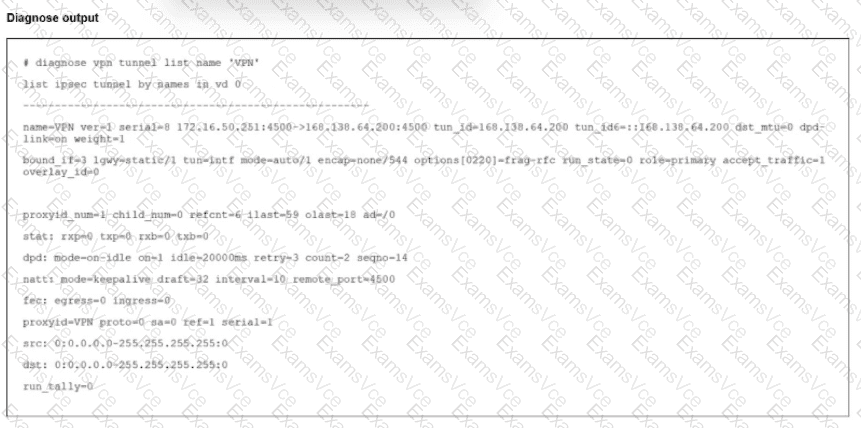
To determine the status of the VPN tunnel, we must examine the specific counters and fields in the diagnose vpn tunnel list output provided in the exhibit.
Analyze Phase 2 Status (Option A):
The output displays child_num=0.
In IKEv2 (and IKEv1 implementations in FortiOS), "Child SAs" refer to the Phase 2 (IPsec) Security Associations that carry the actual data traffic.
A value of 0 indicates that no Phase 2 tunnels are established. If Phase 2 were up, child_num would be at least 1.
Additionally, under the proxyid section, the field sa=0 confirms there is no active Security Association for that traffic selector.
Analyze Traffic Status (Option C):
The stat line shows: rxp=0 txp=0 rxb=0 txb=0.
rxp (Received Packets) and txp (Transmitted Packets) are both zero. This definitively confirms that no traffic is traversing the tunnel currently. This is expected since Phase 2 is down.
Analyze Phase 1 Status (Why B is incorrect):
The tunnel entry exists in the list with a valid tun_id, and NAT-Traversal is active (natt: mode=keepalive).
The presence of the tunnel in this command output, along with active Keepalive mechanisms, typically indicates that Phase 1 (IKE SA) is established and the peers are communicating on port 4500 (NAT-T), even though the data tunnels (Phase 2) failed to negotiate. If Phase 1 were down, the tunnel would often not appear in this "list" view or would show different status flags indicating a complete connection failure.
Conclusion: The exhibit shows a scenario where the Phase 1 control channel is likely up (evidenced by the entry existence and NATT keepalives), but the Phase 2 data channel is down (child_num=0), resulting in zero traffic flow (rxp=0/txp=0).