Comprehensive and Detailed Explanation
HPE Press guide context | PDF page 155 | HPE Press, Aruba Certified Associate – Campus Access Official Certification Study Guide
Technical Deep Dive — Original Chat Wording
Link Aggregation Control Protocol (LACP) allows multiple physical Ethernet interfaces to function as one logical link aggregation group.
A LAG can increase available aggregate bandwidth and provide resiliency when individual member links fail.
However, a physically connected interface is not necessarily an operational member of an LACP aggregation.
Successful LACP operation requires compatible negotiation and synchronization between the connected devices.
The AOS-CX command:
show lacp interfaces
displays detailed operational information about the participating physical interfaces.
Important fields include the Actor state, Partner state, LACP flags, partner system information, and forwarding status.
The synchronization, collecting, and distributing states are especially important.
A successfully synchronized member can participate in traffic forwarding when its collecting and distributing states are active.
A member reporting an out-of-sync or defaulted-neighbor condition may indicate incorrect peer configuration, absent LACP protocol messages, or another aggregation problem.
For further verification, administrators can use:
show interface lag
show interface lag brief
show lacp aggregates
These commands provide complementary information about aggregate speed, interface state, and member configuration.
Traffic counters are useful for performance analysis, but they do not by themselves establish whether LACP negotiation is successful.
VLAN information also cannot conclusively determine LACP synchronization.
Therefore, Option C (`show lacp interfaces`) is correct.
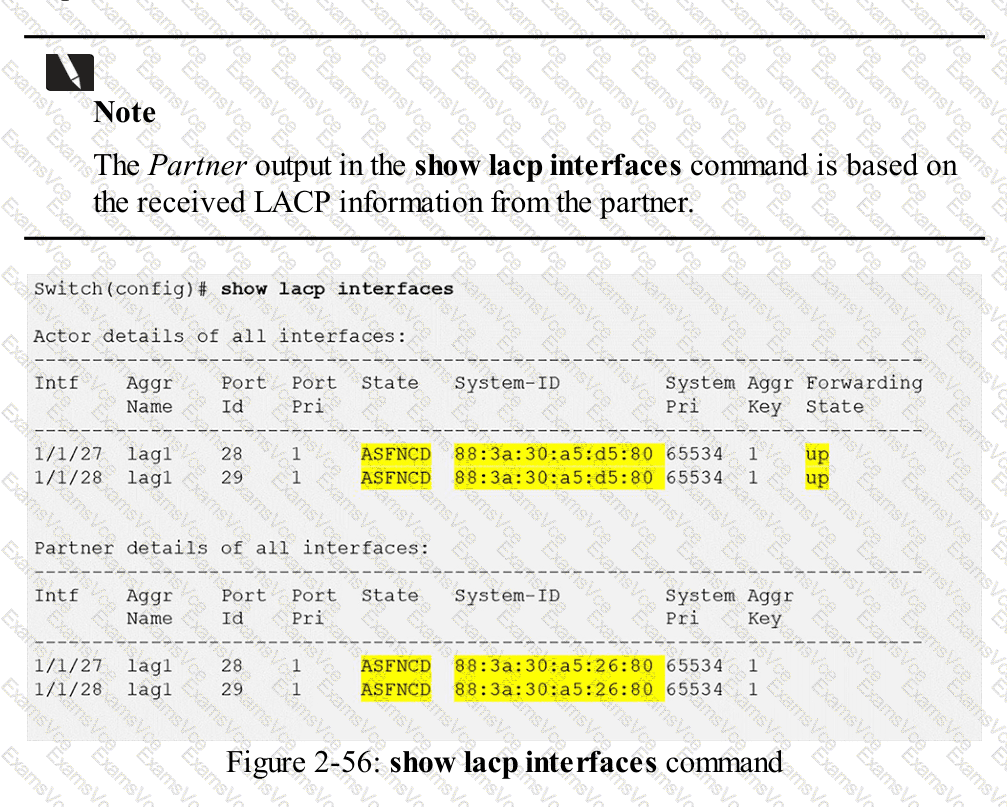
HPE Press study-guide figure / related learning illustration · Q110 Fig 2-56 LACP