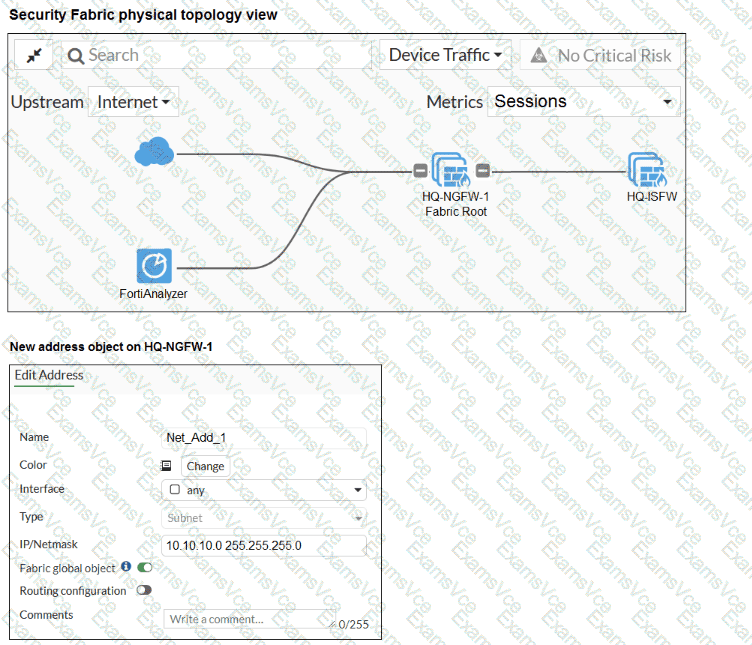
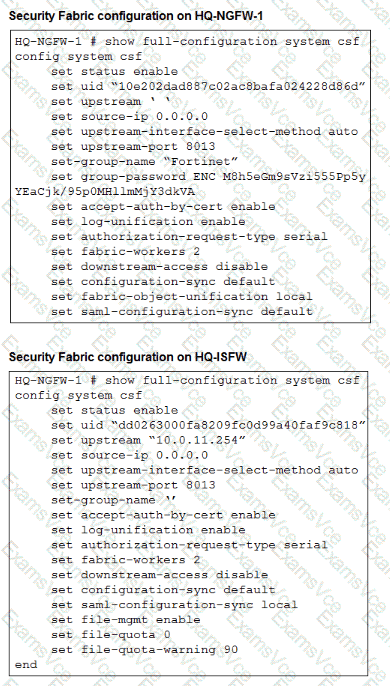
The study guide text surfaced from the PDF did not return a matching paragraph for fabric-object-unification, but the exhibit itself shows these critical details:
On HQ-NGFW-1 , set configuration-sync default and set fabric-object-unification local
On HQ-ISFW , set configuration-sync default
The new address object on HQ-NGFW-1 has Fabric global object enabled
Those exhibit settings indicate that the object is intended to be a fabric-wide object, but the root FortiGate is currently configured with fabric-object-unification local , which prevents that object from being unified across the fabric.
Technical Deep Dive:
The correct answer is C .
Here is the key logic:
The address object was created on the root FortiGate with Fabric global object enabled .
Normal configuration sync is already set to default , so this is not a generic sync-disabled problem.
The root device is specifically configured with set fabric-object-unification local .
That setting keeps fabric objects local to the device rather than unifying them across downstream fabric members.
Therefore, to make the object propagate as a shared Security Fabric object, the administrator must change the root setting to:
config system csf
set fabric-object-unification default
end
Why the other options are wrong:
A is wrong because the downstream device already has configuration-sync default, and changing it to local would make synchronization more restrictive, not less.
B is wrong because saml-configuration-sync is unrelated to firewall address object synchronization.
D is wrong because downstream-access controls downstream management access behavior, not fabric object propagation.
Operationally, this feature matters when you want shared address objects, services, and policy-referenced objects to remain consistent across the Security Fabric. It reduces duplicate object administration and helps keep policy logic normalized across root and downstream FortiGate devices.