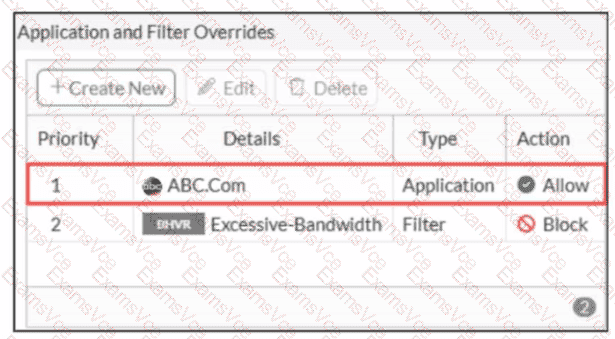
In FortiOS 7.6 Application Control, security logs are generated primarily for actions such as Block or Monitor, not for Allow actions.
What is happening in the exhibit
An Application Override is configured for ABC.Com
Type: Application
Action: Allow
The application control profile is applied to a firewall policy
Logging is enabled on the firewall policy
Traffic to ABC.Com is successfully allowed
However, no security logs appear for ABC.Com.
Why no logs are generated
In FortiOS 7.6:
Application Control logs are written to Security Logs when:
An application is Blocked
An application is Monitored
When an application action is set to Allow:
The traffic is permitted silently
No application control security log is generated
Even if policy logging is enabled
This is expected and documented behavior.
To generate logs for allowed applications, the action must be set to Monitor, not Allow.
Why the other options are incorrect
A. ABC.Com is hitting the category Excessive-BandwidthIncorrect. ABC.Com has a higher-priority explicit override (priority 1), so it is not evaluated against the Excessive-Bandwidth filter.
B. The ABC.Com Type is set as Application instead of FilterIncorrect. Application-type overrides are valid and commonly used; this does not suppress logging.
C. The ABC.Com must be configured as a web filter profileIncorrect. This traffic is being evaluated by Application Control, not Web Filter.