From the exhibits:
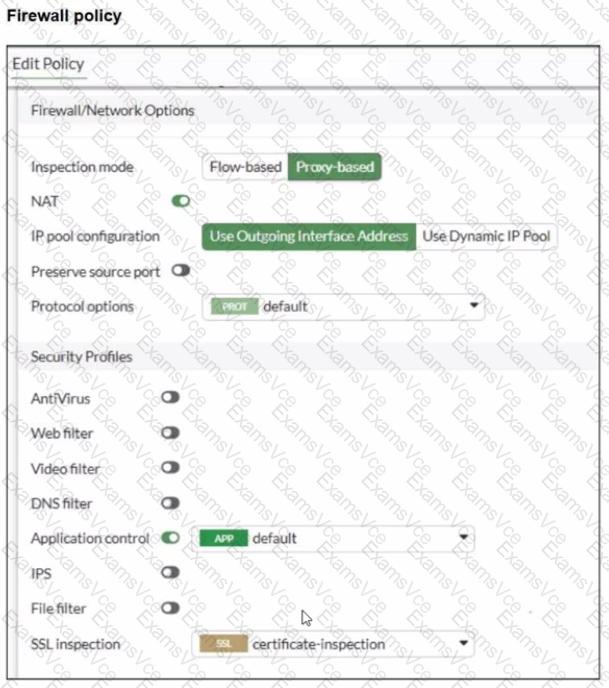
The firewall policy has Application Control enabled and uses certificate-inspection for SSL inspection.
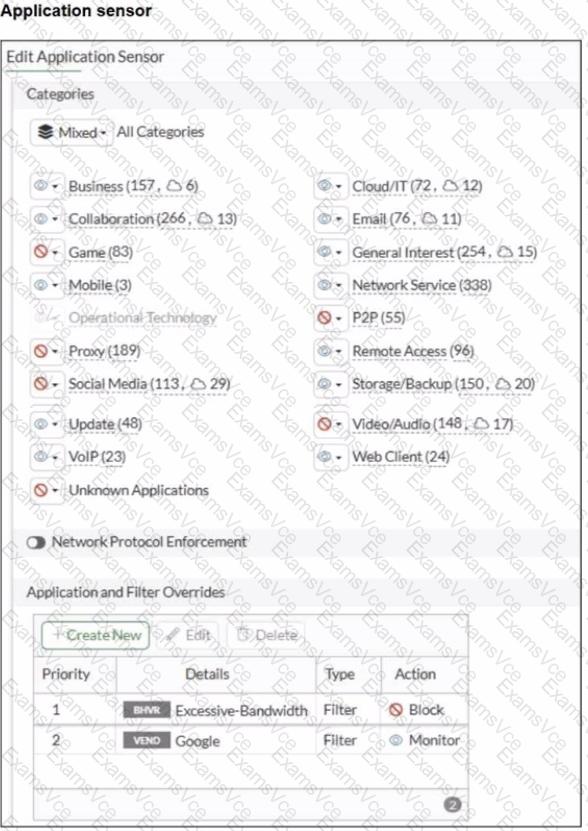
The application sensor has Application and Filter Overrides with the following order (priority):
Excessive-Bandwidth with action Block
Google (vendor filter) with action Monitor
In FortiOS, Application and Filter Overrides are evaluated by priority (top-down). The first matching override is applied. If traffic matches an earlier override with Block, it will be blocked even if a later override would Monitor/Allow it.
Why Google apps fail while www.fortinet.com works:
Many Google applications can be detected as (or can trigger) the Excessive-Bandwidth behavior/signature depending on the specific service and traffic pattern.
Because Excessive-Bandwidth (Block) is above Google (Monitor), Google-related traffic may match the first rule and be blocked before the Google override is evaluated.
Access to www.fortinet.com works because that traffic is not matching the Excessive-Bandwidth override.
Therefore, to resolve:
B. Move up Google in the Application and Filter Overrides section to set its priority higher
This ensures Google matches the Google override before any broader blocking override is applied.
E. Set the action for Google in the Application and Filter Overrides section to Allow
This explicitly permits Google applications once the higher-priority match occurs (stronger than Monitor for troubleshooting and ensuring access).
Why the other options are not the best fit here:
A (deep-content inspection) can help identify more HTTPS applications, but the exhibit already shows a specific Google override configured; the immediate issue is the override evaluation order and action.
C relates to Web Filter URL categories, but the problem is occurring under Application Control behavior/vendor overrides.
D (flow-based) is not required to fix an override priority/action conflict.