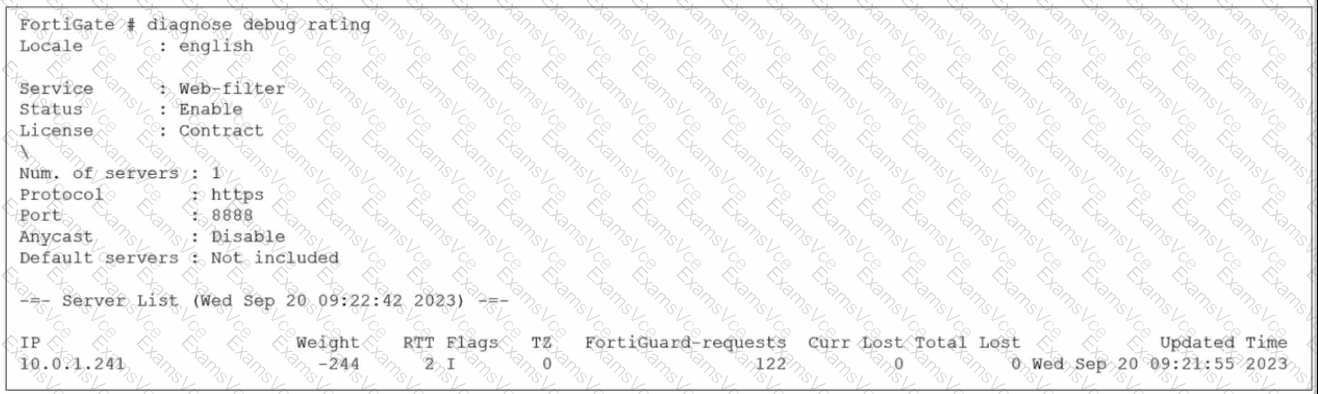
Based on the diagnose debug rating output provided in the exhibit and the standard behavior of the FortiGuard connection mechanism in FortiOS 7.6:
Weight Calculation (Statement A is True):
In FortiOS, the rating server selection process uses a weight-based system.
According to official documentation, the weight increases with failed packets (lost responses) and decreases with successful packets.
This mechanism ensures that servers with poor reliability are penalized by having higher weights, effectively pushing them to the bottom of the preference list.
Default Port Communication (Statement D is True):
The exhibit explicitly shows the communication is using HTTPS on port 8888.
In FortiOS 7.6 (and legacy versions like 6.2/6.4), FortiGuard filtering supports specific protocols and ports: HTTPS on ports 443, 53, and 8888, where 8888 is considered a default port for FortiGuard queries.
Ports 53 and 8888 are standard for both UDP and TCP/HTTPS FortiGuard communications to avoid common firewall blocks on standard web ports.
Why other options are incorrect:
Statement B (Unreliable protocols): While you can configure UDP (which is unreliable), the exhibit specifically shows HTTPS is being used, which is a reliable (TCP-based) protocol.
Statement C (DNS lookup): In the "Flags" column of the server list, a server found via DNS lookup would be marked with the "D" flag. The exhibit shows the flag as "I" (indicating the last INIT request was sent to this server) and a numeric "2," but the "D" flag is absent. Additionally, the IP 10.0.1.241 is a private address, suggesting it is a manually configured FortiManager or local override server rather than a public server found via global DNS lookup.