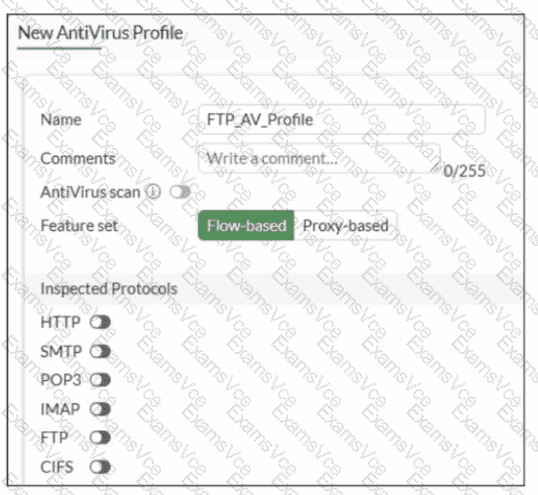
In FortiOS 7.6, the Antivirus scan master switch in an antivirus profile becomes available only after at least one supported protocol is enabled for inspection.
What the exhibit shows
A new antivirus profile named FTP_AV_Profile
Feature set: Flow-based
Antivirus scan switch is grayed out
All Inspected Protocols (HTTP, SMTP, POP3, IMAP, FTP, CIFS) are currently disabled
Why the Antivirus scan switch is grayed out
In FortiOS antivirus profiles:
The Antivirus scan toggle is a dependent control
It cannot be enabled unless at least one inspected protocol is selected
This prevents enabling AV scanning when there is no traffic type to scan
This behavior is documented in the FortiOS 7.6 Antivirus Profile configuration section.
Once you enable a protocol (for example, FTP), the Antivirus scan switch becomes active and configurable.
Why option B is correct
B. None of the inspected protocols are active in this profile.
All protocol toggles are OFF
Therefore, FortiGate disables (grays out) the Antivirus scan option
This is expected and correct behavior
Why the other options are incorrect
A. Antivirus scan is disabled under Feature visibilityIncorrect. Feature Visibility controls whether Antivirus appears in the GUI, not whether the scan switch is enabled inside a profile.
C. Feature set must be Proxy-basedIncorrect. Antivirus scanning is supported in both flow-based and proxy-based modes.
D. Less than 2 GB RAM does not support Antivirus scanIncorrect. Memory size affects performance and offloading, not basic AV scan availability.