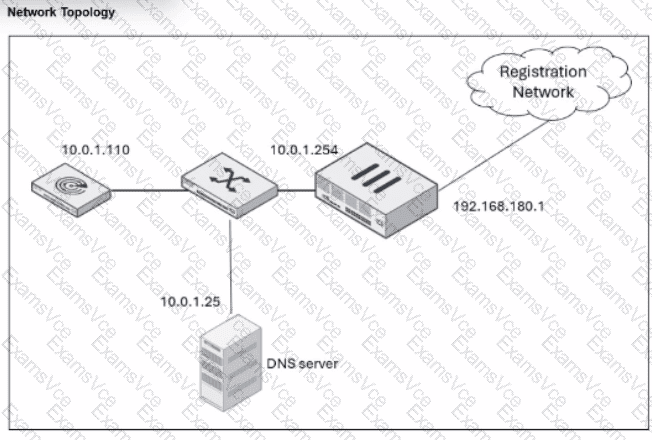
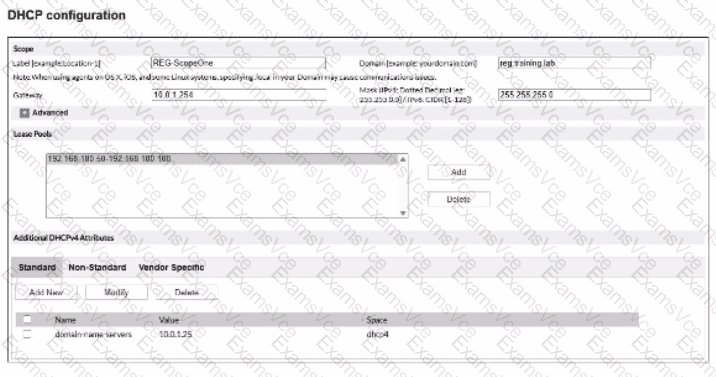
In a FortiNAC-F deployment, the configuration of theDHCP scopefor isolation networks (Registration, Remediation, etc.) must perfectly align with the underlying network infrastructure to ensure that isolated hosts can communicate with the FortiNAC appliance. In the provided exhibits, there is a clear discrepancy between theDHCP configurationand theNetwork Topology.
As shown in the "Network Topology" exhibit, theRegistration Networkresides on a router interface (or sub-interface) with the IP address192.168.180.1. This address represents the default gateway for any host placed into the Registration VLAN. However, the "DHCP configuration" exhibit shows the scope"REG-ScopeOne"configured with aGateway of 10.0.1.254. This 10.0.1.254 address belongs to the management/service network (port2 of FortiNAC), not the registration subnet. If a host in the Registration VLAN receives this incorrect gateway via DHCP, it will attempt to send all off-link traffic to an unreachable IP, preventing it from loading theCaptive Portalor communicating with the FortiNAC server.
According to theFortiNAC-F Configuration Wizard Reference, when defining a Layer 3 network scope, the "Gateway" field must contain the IP address of the router interface that acts as the gateway for that specific isolation VLAN. The FortiNAC appliance itself usually sits on a different subnet, and traffic is directed to it via the router's DHCP Relay (IP Helper) and DNS redirection.
"When configuring scopes for a Layer 3 network, theGatewayvalue must be the IP address of the router interface for that subnet. This allows the host to reach its local gateway to route traffic. If the gateway is misconfigured, the host will be unable to reach the FortiNAC eth1/port2 interface for registration... Ensure the Gateway matches the network topology for the isolation VLAN." —FortiNAC-F Configuration Wizard Reference Manual: DHCP Scopes.