The correct answer is C .
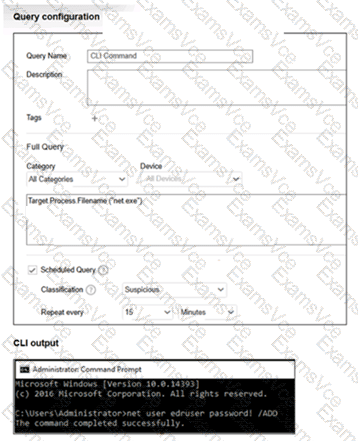
The exhibit shows a Threat Hunting saved query named CLI Command with the query:
Target.Process.Filename ( " net.exe " )
It is configured as a Scheduled Query , classified as Suspicious , and set to repeat every 15 minutes . The FortiEDR guide states that saving a Threat Hunting query allows it to be defined as a scheduled query to automate threat detection. When the scheduled query runs and detects matching activity, a security event is automatically created in the Incidents tab .
The guide also states that scheduled queries run automatically according to the configured schedule, and each time a match is detected, FortiEDR generates a security event in the Incidents tab and sends notifications according to the security event configuration.
So, when the endpoint runs:
net user edruser password! /ADD
FortiEDR records the relevant process activity, and when the scheduled query runs, it matches the target process net.exe and creates an incident/security event. It is not immediate by default because the query is scheduled every 15 minutes. It also does not block CLI commands by default unless playbook actions or policy controls are configured. The activity is treated according to the saved query classification, which in the exhibit is Suspicious .
=========