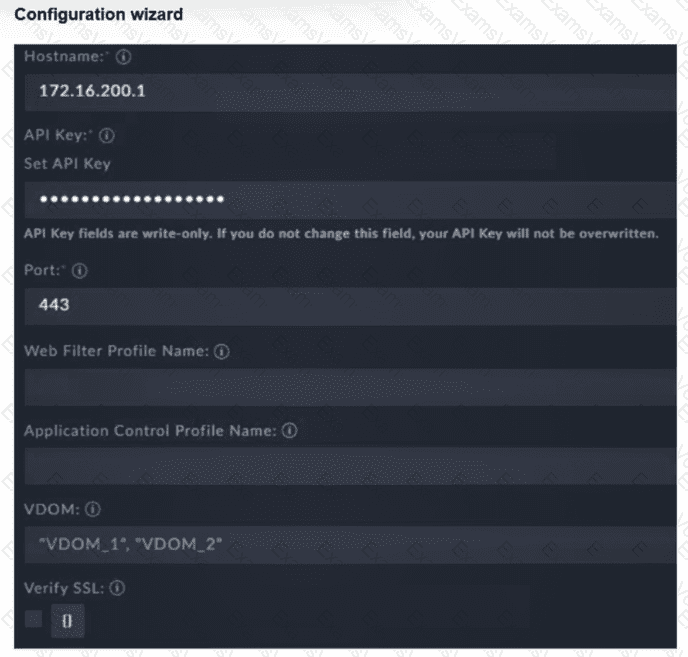
To establish a successful integration between FortiSOAR 7.6 and a FortiGate firewall via the FortiGate connector, specific administrative and network requirements must be met on the FortiGate side:
API Administrator and Key (D): FortiSOAR does not use standard UI login credentials. Instead, it requires a REST API Administrator account to be created on the FortiGate. This account must be assigned an administrative profile with the necessary permissions (e.g., Read/Write for Firewall policies or Address objects). Upon creation, the FortiGate generates a unique API Key, which must be entered into the " API Key " field of the FortiSOAR configuration wizard as shown in the exhibit.
HTTPS Management Access (C): The connector communicates with the FortiGate using REST API calls over HTTPS (port 443 by default). Therefore, the physical or logical interface on the FortiGate that corresponds to the " Hostname " IP (172.16.200.1) must have HTTPS enabled under " Administrative Access " in its network settings. If HTTPS is disabled, the connection will time out or be refused.
Why other options are incorrect:
Trusted hosts (A): While it is a best practice to restrict API access to specific IPs (like the FortiSOAR IP), the integration can technically function without " Trusted hosts " enabled if the network allows the traffic. However, the absence of an API key or HTTPS access will definitively cause a failure regardless of trusted host settings.
VDOM name (B): In the exhibit, the VDOM field contains multiple values ( " VDOM_1 " , " VDOM_2 " ). If VDOMs are disabled on the FortiGate, this field should generally be left blank or set to the default " root. " Setting it specifically to " VDOM_1 " when VDOMs are disabled is not a universal requirement for connectivity; the primary handshake depends on the API key and HTTPS connectivity.