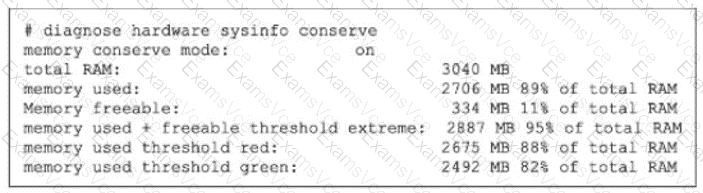
The exhibit shows:
memory conserve mode: on
memory used: 2706 MB 89% of total RAM
memory used threshold red: 2675 MB 88% of total RAM
memory used + freeable threshold extreme: 2887 MB 95% of total RAM
The study guide states that the default thresholds are:
Extreme = 95%
Red = 88%
Green = 82%
So this FortiGate is in conserve mode because memory usage is 89% , which is above the red threshold (88%) , but it has not yet reached the extreme threshold (95%) .
The study guide then explains exactly what happens during conserve mode:
“For traffic that requires proxy-based inspection (and if memory usage has not exceeded the extreme threshold):
config system global
set av-failopen [off | pass | one-shot]
pass (default): All new sessions pass without inspection”
It also says:
“The av-failopen setting also applies to flow-based antivirus inspection.”
And the same page adds:
“If memory usage exceeds the extreme threshold, all new sessions that require inspection (flow-based or proxy-based) are blocked.”
Therefore, with default settings and with memory usage below the extreme threshold , FortiGate is allowing new sessions that require inspection, but bypassing inspection . That matches C .
Why the other options are wrong:
A is wrong because the default behavior is not to block proxy-based inspected sessions; the default is pass , meaning they pass without inspection
B is wrong because if memory rises another 6% , it reaches 95% , which is the extreme threshold . At that point, the study guide says all new sessions that require inspection are blocked
D is wrong because FortiGate blocks all new inspected sessions only when memory usage exceeds the extreme threshold , and the exhibit shows it is currently at 89% , not 95%